
In Sprout HR, the Flexible Per Week schedule is a modern attendance configuration designed for output-driven teams. Unlike traditional fixed shifts (e.g., 8:00 AM to 5:00 PM), this setup prioritizes the total number of hours rendered within a work week—usually 45 hours—rather than the specific time an employee clocks in or out each day.
It is a powerful tool for promoting work-life balance, allowing employees to navigate personal errands while ensuring their professional obligations are met. And, the employees have the privilege to compensate their working hours on other days, as long as they will be able to complete the required weekly hours.
But, despite the Flexible Per Week hours being completed, the employee may still tagged as Absent. Why is that?
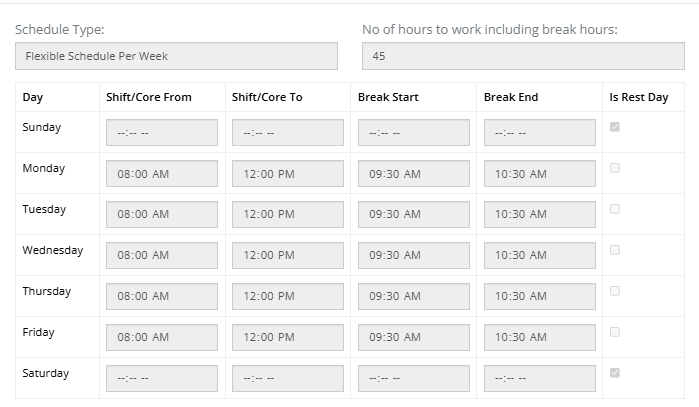
Here’s the sample Work Schedule:
The Attendance Report:
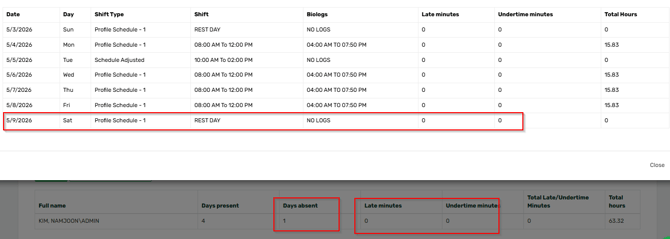
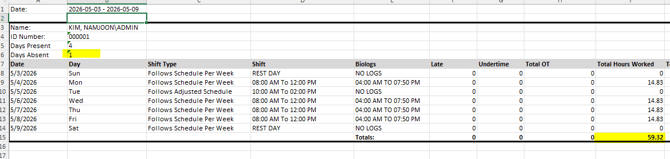
The common reason for this is that the employee has an approved Schedule Adjustment, but is tagged as NO LOGS.

Please note that Schedule Adjustment is an indicator that the employee is expected to work and has actual logs based on the approved date.
To omit the absent tagging, you will just have to cancel the approved SA Application of the employee.
Lastly, to avoid unnecessary absent tagging in the future, only file Schedule Adjustment when needed.
Want real-time responses? Explore Sidekick, your 24/7 guide for product inquiries!