
The BIR Form 2316, also known as the Certificate of Compensation Payment or Income Tax Withheld, is a vital document for every employee. The BIR defines compensation as salaries, wages, or other similar remuneration provided by an employer to an employee for services rendered.
In Sprout Payroll, posting this form ensures that the tax information is finalized and ready for distribution to your employees.
To post BIR Form 2316. Simply follow these steps:
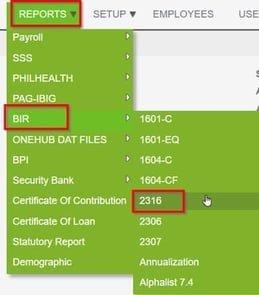
- In your Sprout Payroll account, Click Reports

-
Select BIR
- Select Employees
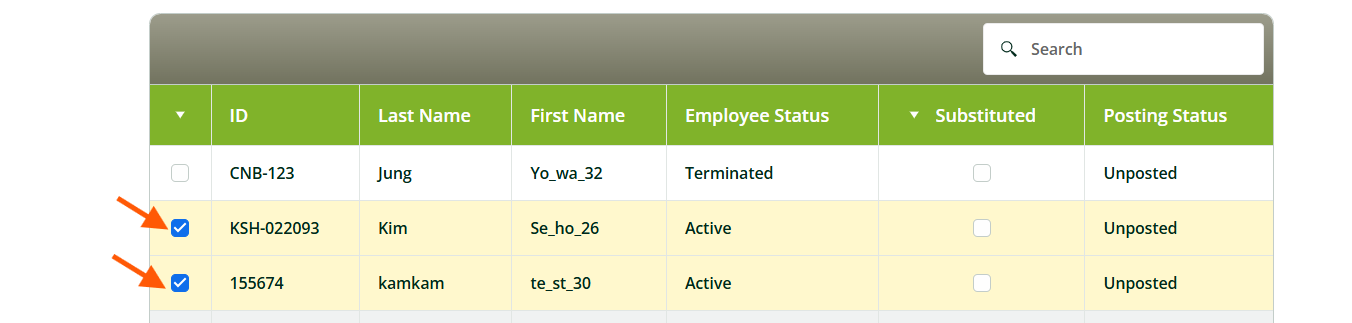
- Click Post.

Note: To proceed with the posting of the selected employee/s, Company TIN in Company Setup is required (Company TIN only accepts 9 or 12 digits)
You may also check these related articles:
How to Ensure BIR Form 2316 Is Generated in Sprout HR
How To Generate BIR Form 2316 from Sprout Payroll
Want real-time responses? Explore Sprout Info, your 24/7 guide for product inquiries!