
Track your time, anytime.
The Attendance page in the Sprout Mobile App lets you quickly view your clock in/out logs wherever you are. It mirrors the attendance records you see in Sprout HR, giving you fast, convenient access to your logs anytime you need them.
Attendance Widget in Sprout Mobile
The Attendance page in Sprout Mobile lets you easily track your clock in/out logs on the go. This feature mirrors what you see in Sprout HR, giving you quick access to your attendance records anytime.
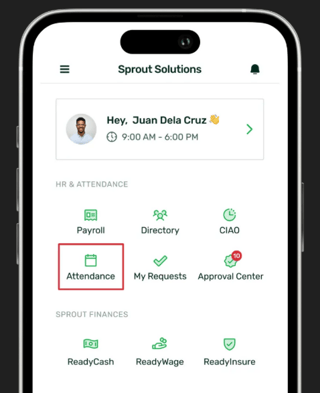
Viewing Attendance Logs
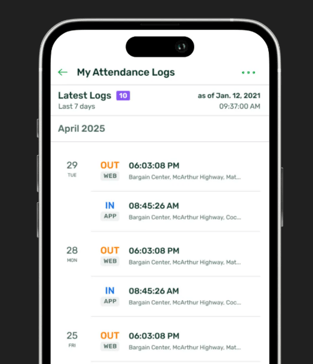
- By default, the Attendance page shows your logs from the past 7 days, so you can quickly review your workweek.
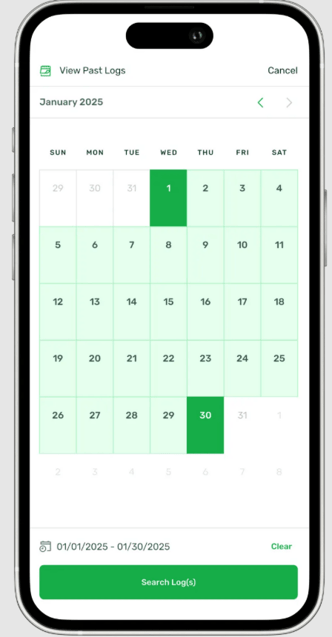
- Tap View Past Logs (calendar icon on the lower right) to access up to 31 days of records for a more detailed review.
Each log entry includes the date, time, and location (if available) of your clock in/out.
Types of Attendance Logs
Attendance logs are tagged based on where they were created:
- APP – Logged via the Sprout Mobile app
- WEB – Logged via Sprout HR web
- BIO – Logged through biometrics
- ETC – Logged by other people or through other modes
- COA – Logged by filing a Certificate of Attendance
The Attendance page makes it easy to monitor your records and quickly spot missing logs. This is especially useful when you receive Timesheet Lock notifications, so you can check and resolve attendance issues before they affect your payroll.
Want real-time responses? Explore Sprout Info, your 24/7 guide for product inquiries!