
Overview
What is an Adjustment Run?
An Adjustment Run in Sprout Payroll is a payroll run used to process additional or corrective payroll transactions outside the employee’s regular payroll run. It can be used to apply adjustments such as additional earnings, deductions, or other payroll corrections that need to be processed separately from the employee’s regular payroll.For separated employees, an Adjustment Run may also be used to process post-separation adjustments that need to be included after their final or regular payroll has already been processed.Important Note for Inactive Employees
When creating an Adjustment Run for an inactive (separated) employee, the employee may not appear in the selection list if the Adjustment run Pay date is later than the employee’s official separation date. The employee’s status and the selected Adjustment run Pay date are considered when determining which employees are available for selection.Resolution
To successfully create an Adjustment Run for an inactive employee:
- Create the Adjustment Run using a Pay date or adjustment date that falls before the employee's separation date or status date in Sprout Payroll Employee Profile.
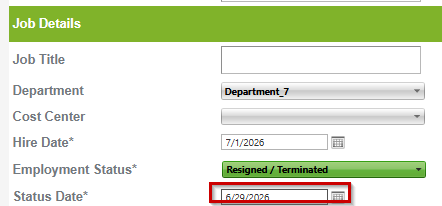
- Ensure the selected adjustment period is within the employee's active employment period.
- Example: If the employee's separation date is June 29, the payroll coverage should be before or not inclusive of June 29. After saving the Adjustment Run, verify that the inactive employee now appears in the Employees for this Payroll list.

Expected Result
The inactive employee will be available for selection in the Adjustment Run, provided the Adjustment Pay date is within the employee's active employment period.
Got a question or need extra help? Sidekick makes it easy — get answers, raise a ticket, or schedule a call with our experts, all in one place.