
When a De Minimis Allowance is uploaded as a One-Time Adjustment or Recurring Adjustment and the 'De Minimis' option is ticked under Absent Deduction in payroll setup, the system automatically computes a corresponding deduction during payroll runs. Unticking this setting and reprocessing the payroll removes the deduction.
Issue / scenario
Employees continue to have a De Minimis deduction applied during payroll runs even after the client attempts to remove it. The deduction persists because (1) a De Minimis Allowance was uploaded as a One-Time Adjustment for the affected employees, and (2) the 'De Minimis' checkbox under Absent Deduction in the payroll computation setup is still enabled, causing the system to automatically compute the deduction.
Environment
Sprout Payroll — Payroll Computation Setup (Setup > Company > Profile > Payroll Computation)
Resolution
- Confirm whether a De Minimis Allowance was uploaded as a One-Time Adjustment or Recurring Adjustment for the affected employees in the current payroll run. Please note that the deduction happens when both the adjustment and the enabled De Minimis settings are present.
Sample:
One-Time Adjustment: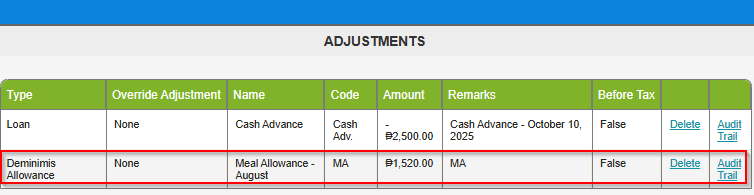
Recurring Adjustment: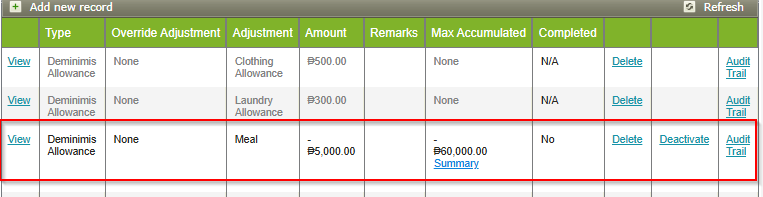
- Navigate to Setup > Company > Profile > Payroll Computation. Under the Absent Deduction section, locate the 'De Minimis' checkbox and untick it. Save the changes.
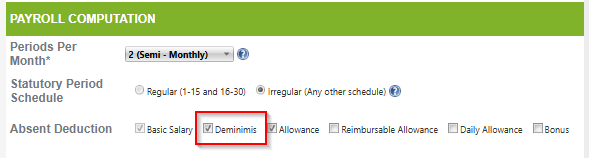
- If the payroll has not yet been approved and credited to employees, unpost the payroll and reprocess it so the updated configuration takes effect. Refer to the Sprout guide How To Unpost Payroll in Sprout Payroll '' for step-by-step instructions. Note: Only unpost and reprocess the payroll if it has not yet been approved and credited to employees. Do not unpost payroll that has already been approved or credited — in that case, corrections should go through manual adjustments to your next payroll instead.
- Note: If the De Minimis absent deduction setting needs to apply to other payroll groups, re-tick the checkbox and save before processing those groups' payroll runs.
Frequently asked questions
Why is a De Minimis deduction still showing for some employees even though I tried to remove it?
The deduction only triggers when both are true for an employee in that payroll run: a De Minimis Allowance was uploaded as a One-Time or Recurring Adjustment, and the 'De Minimis' checkbox under Absent Deduction is ticked.
Will unticking the De Minimis absent deduction setting affect all payroll groups?
Yes. If you untick this setting, it will no longer apply to any payroll group. If certain payroll groups still require the De Minimis absent deduction, remember to re-tick the checkbox and save before processing those groups.
Want real-time responses? Explore Sidekick, your 24/7 guide for product inquiries!