
Overview
The Audit Trail may display numerical ID codes instead of actual monetary amounts when changes are made to an employee's SSS EE contribution setting
These codes correspond to specific SSS contribution values and can be cross-referenced using the SSS Contribution Code Reference file.
How SSS Audit Logging Works
Verify the Audit Trail code against the SSS Contribution Code Reference file.
- Numerical System Codes: The displayed ID represents the configured SSS EE value, not the monetary amount itself.
- System Automated Option: For Let the system decide, the system automatically determines the contribution based on the applicable SSS contribution table
Quick Reference Mapping Table
Use this quick guide to translate common Audit Trail codes into their corresponding Employee Profile settings.
|
Audit Trail Code (ID) |
Employee Profile Value (SSS EE) |
Setting Type / Description |
|
Let the system decide |
Let the system decide |
Automated calculation based on current SSS bracket table |
|
211 |
₱250.00 |
Fixed SSS Employee Share amount |
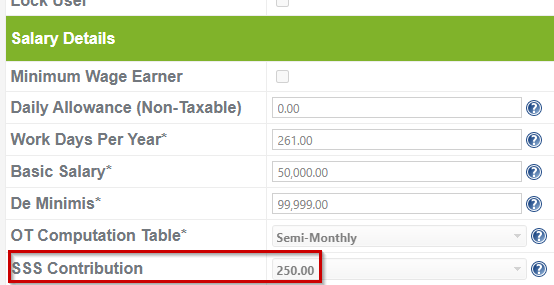
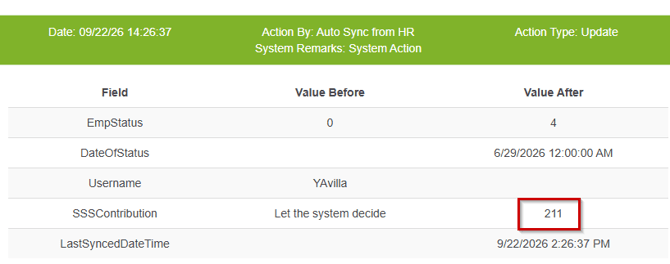
Note: For a complete list of all monetary values and their corresponding numerical codes, refer to the master file SSS Contribution Code Reference
Key Takeaway:
When checking SSS EE updates in the Audit Trail, you'll see numerical IDs instead of amounts. Use the SSS Contribution Code Reference file to look up the exact contribution value and configuration.
Got a question or need extra help? Sidekick makes it easy — get answers, raise a ticket, or schedule a call with our experts, all in one place.