
This article provides the equivalent ID values used in the Audit Trail for employee statuses. These IDs may appear in system logs, database records, or audit trail entries whenever an employee’s status is updated.
When reviewing Audit Trail records, employee statuses may appear as numeric IDs instead of status names. This article provides the corresponding status for each ID to help interpret audit logs accurately.
These IDs are system-generated values used to represent employee statuses in Audit Trail logs and other system records.
Employee Status ID Reference|
ID |
Status Description |
|
0 |
Inactive |
|
1 |
Active |
|
2 |
On Leave |
|
3 |
Terminated |
|
4 |
Probationary |
|
5 |
Contractual |
|
6 |
End of Contract |
|
7 |
Part Time (Hourly) |
|
8 |
Part Time (Daily) |
|
9 |
Part Time (Monthly) |
|
10 |
Suspension |
|
11 |
Maternity |
|
12 |
Paternity |
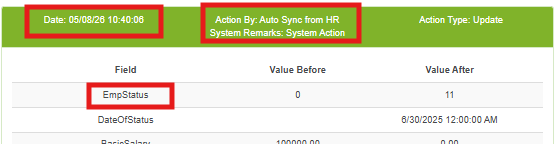
Below is a sample interpretation of an Audit Trail entry:
Interpretation
In the Audit Trail entry, the employee status changed from 0 (Inactive) to 11 (Maternity) on 05/08/26 10:40:06 through Sprout HR.
Important notes:
- The values above are system-generated identifiers used internally in audit records.
- When reviewing audit trail logs, refer to this table to identify the corresponding employee status.
- Always verify the status change details in the Audit Trail before making any employee record updates or investigations.
Want real-time responses? Explore Sidekick, your 24/7 guide for product inquiries!