
Currently, employees with future-dated termination are not automatically synced to Payroll. If you need to process their final pay in advance, the employment status and separation details must be temporarily adjusted and properly synced between HR and Payroll systems.
Follow the steps below:
- Update Employment Status in Sprout HR
- Change the employee’s status from Inactive → Active in Sprout HR.
- This ensures the record becomes editable for syncing purposes.
- Revert Employment Status
- After syncing, change the status back from Active → Inactive.
- Ensure that the Separation Date is NOT set as future-dated during this step to allow proper synchronization with Payroll.
- Correct the Separation Date in HR Profile
- Update the Separation Date in the employee’s HR profile.
- This ensures that the HR record reflects the accurate termination date.
- Update Status Date via Bulk Upload (HR Module)
- Use the Bulk Upload template in HR to update the Status Date column.
- This step ensures the correct status date is reflected and synced properly in Payroll.
- Verify Payroll Sync
- Confirm that the employee’s termination details and status are correctly reflected in Payroll after the updates.How to Edit Employees in Bulk
In Sprout HR, the Separation Date and Status Date serve different purposes across HR and Payroll, which is why they are set one day apart:
- Separation Date in HR (04/22/2026)
This represents the effective date of the employee’s termination in the system. It is typically set as the day after the employee’s last working day to ensure that their employment remains active up to their final day. - Status Date in Payroll (04/21/2026)
This reflects the employee’s actual last working day. Payroll uses this date to accurately compute final pay, including salaries, attendance, and any remaining payable items up to the last day worked.
In short, Payroll is based on the last day worked, while HR uses the following day to officially mark the employee as inactive in the system. This setup helps avoid payroll discrepancies and ensures proper cutoff for compensation and system access.
Once all are updated (both HR and PR profiles are in inactive statuses), you can create a new final pay run.
The status and the date of effectivity of the status serve as the system's current validation for the employee to appear in the Final Pay run. The employee will only reflect on the Final Pay run if the status is Inactive or Terminated.
Notes:
- If you wish to credit the basic salary in full to the employee, in the Final Pay Options, you need to select Not Prorated on Basic Salary.
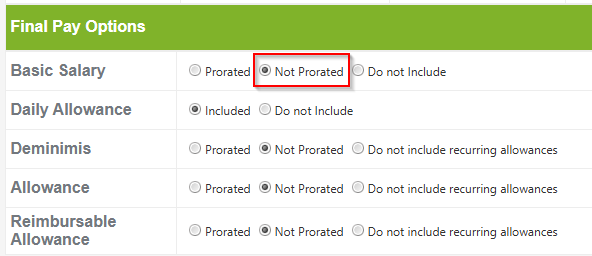
The Basic Salary that will be credited will be based on the payroll frequency of your account. This can be found under Setup > Company > Profile
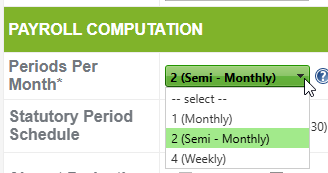
- If Monthly - monthly basic salary
- If Semi-Monthly - semi-monthly basic rate
- If there should be no adjustments to be made on the 13th Month, please select NO in Include 13th Month Pay in Final Pay
Additionally, please be advised that once an employee is marked as Terminated, they will no longer have access to their Sprout HR account.
Want real-time responses? Explore Sidekick, your 24/7 guide for product inquiries!