
Sprout has discontinued the payment pickup option. All payments must now be made online or via bank transfer.
You may use any of the following payment channels:
1. Bills Payment via Online Banking
-
UnionBank Business Banking Portal – Select “Sprout Solutions Phil Inc.” from the registered billers.
-
AUB Online Bills Payment – Required fields:
-
BIN: 20000001
-
Service Invoice Number: Use only the numeric portion (e.g., SI_SSPI00000001 →
2000000100000001).
-
-
BDO Business Banking Portal & BDO App – Select “Sprout Solutions Phil Inc.” from the registered billers.
-
Easyway Online Payment – Select “Sprout Solutions Phil Inc.” from the registered billers.
2. Bank Transfer / Deposit
Payments can also be made via direct deposit to the following accounts under Sprout Solutions Phil., Inc. (PHP, Checking Account):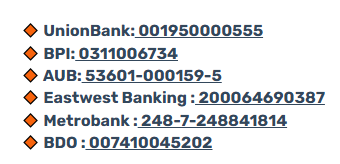
3. Payment Confirmation
After making a payment, please send the following to billings@sprout.ph:
-
Proof of payment
-
BIR Form 2307 (if applicable)
For questions or further assistance, you may also reach out to billings@sprout.ph.
Want real-time responses? Explore Sidekick, your 24/7 guide for product inquiries!