
How to Change an Employee's Level 1 Attendance Request Approver in Sprout HR
If you need to update the primary approver for an employee's attendance requests (like leave or overtime) in Sprout HR, the change must be made through the employee's profile.
Step-by-Step Guide for Changing the Level 1 Approver
Follow these simple steps to update the employee's Level 1 Approver:
- Go to the Employee Profile of the staff member whose approver needs changing.
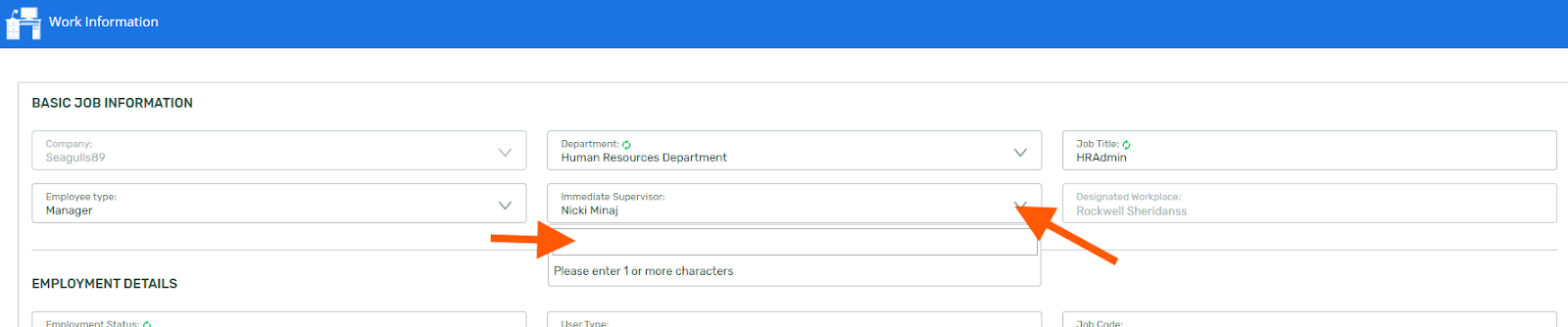
- Navigate to the Work Information section.

- Locate the Immediate Supervisor field.
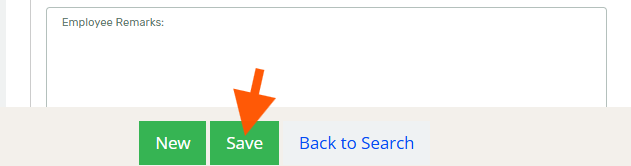
- In the Immediate Supervisor field (which corresponds to the Level 1 Approver), simply enter the name of the new supervisor/approver, then click save.
Important Notes on Approver Levels
- Level 1 Only: Please note that the Level 1 Approver is the only approver level that can be changed directly via the Employee Profile using the Immediate Supervisor field.
- Level 2 and Up: To change Level 2 Approvers and above, you'll need to go to Maintenance > Company > Approval Levels

Reminders for Approver Changes
It’s important to understand how this update impacts employees’ past, current, and future requests:
- New Applications Only: Any update made to the Level 1 Approver will only apply to newly filed applications submitted by the employee after the change was saved.
- Pending Applications: Applications that are already pending approval will still follow the old approver setup.
- If you want these pending applications to reflect under the new approver's bucket, the employee should update or resubmit the pending applications after the profile change is complete.
- If you want these pending applications to reflect under the new approver's bucket, the employee should update or resubmit the pending applications after the profile change is complete.
- Previous Applications: For the applications that were approved, rejected, or cancelled before the Level 1 approver was replaced.
- The new approver will only be able to see applications of employees who are currently assigned under them. Previous applications filed before the change in approver will not be visible on their end.
- However, an Admin user will still have full visibility of these applications regardless of the assigned approver.
For your reference on how approvals are handled during these transitions, here are some helpful guides:
-
Will the Change in Approver Automatically Reflect in the Filed Applications?
-
I Filed an Attendance Application but my Approver was Suddenly Changed -- Who's the Boss Now?
-
How to Ensure that Pending Applications of the Employees will be Approved Once their Approver Leaves the Company?
To get real-time answers to this and other Sprout product inquiries 24/7, we encourage you to explore Sprout Info! It's your instant guide for comprehensive product information and support.