
Overview
The SSS AMSCCL (Automated Monthly Salary Credit Collection List) is an electronic report used to submit employees’ monthly salary credits and corresponding contributions to the Social Security System (SSS).
This report serves as the digital version of the SSS R3 and is required for proper contribution reporting and compliance.
When to Use This Report
You can generate the SSS AMSCCL when:
- Preparing SSS contribution submissions
- Validating employee salary credits and contributions
- Ensuring compliance with SSS reporting requirements
Steps to Generate SSS AMSCCL
- Log in to Sprout Payroll
- Go to the Reports Module

- Select SSS
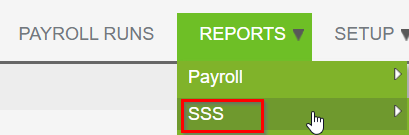
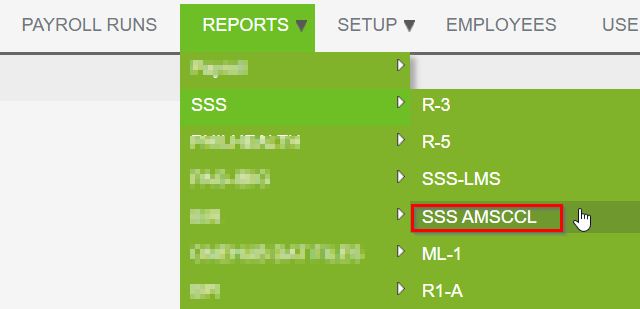
- Click on SSS AMSCCL
- Fill in the required details (e.g., payroll period, company, and other necessary filters)
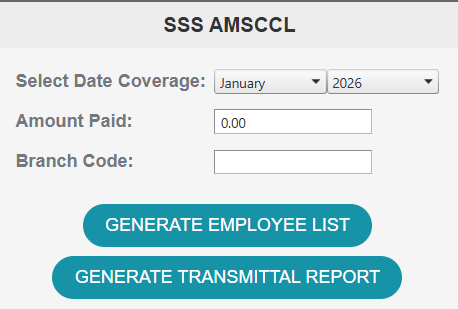
- Click Generate
Important Notes
- Ensure that payroll for the selected period has been processed and finalized before generating the report.
Need Assistance?
If you encounter any issues or need help generating the report, please reach out to our support team for assistance.
Want real-time responses? Explore Sidekick, your 24/7 guide for product inquiries!