
If you're looking to update or change your company's logo in Performance Plus, you don't need to contact support—you can handle it yourself right now. This quick guide walks system administrators through the simple steps of deleting the old logo and uploading a new one, all within the Administration tab. Let's get started!
Can the Company Logo be modified in Performance Plus?
Yes, changing your company logo can be done directly by an administrator.
Follow these steps to modify a new company logo:
-
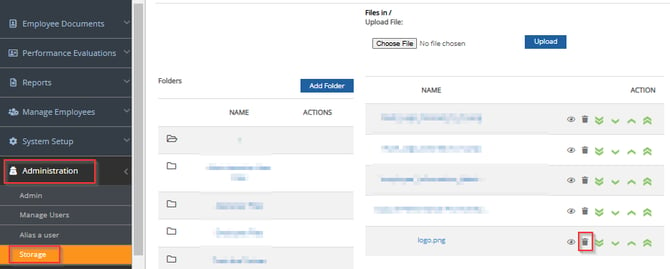
Navigate to the Administration section in the left-hand menu.
-
Click on Storage under the Administration menu.
-
Locate the currently uploaded logo file
-
In the ACTION column for the logo file, click the trash can icon (🗑️) to delete the currently uploaded image.
-
Once the old file is deleted, use the "Choose File" button at the top of the screen to select your new logo image from your computer.
-
Click the "Upload" button to replace the deleted file with the new logo.
Your company logo should now be updated throughout the Performance Plus system.
Lastly, the following file types are accepted:
- bitmap (.bmp)
- jpeg (.jpg)
- gif (.gif)
Want real-time responses? Explore Sidekick, your 24/7 guide for product inquiries!