
New Feature: SSS Emergency Loan Adjustment
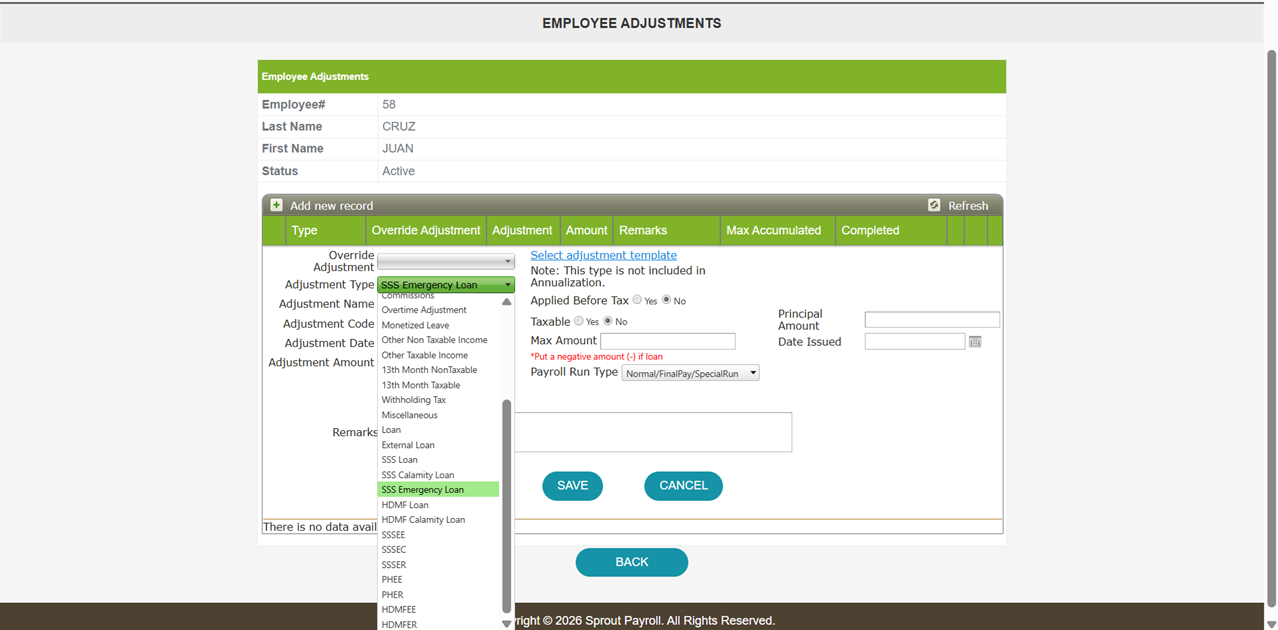
Previously, Emergency Loan Adjustment was not available in the system. As a temporary workaround, users were advised to utilize the Calamity Loan feature to accommodate emergency loan adjustments. This functionality is now supported through the Emergency Loan Adjustment configuration.
Sprout Payroll now supports a new Adjustment Type: SSS Emergency Loan to help employers process salary deductions for employees who avail of the Social Security System (SSS) Emergency Loan Program.
This new adjustment type simplifies payroll processing by allowing HR and Payroll administrators to record and deduct emergency loan repayments directly through Payroll.
What's New
A new adjustment type, SSS Emergency Loan, is now available under Employee Adjustments.
When creating an adjustment:
- Navigate to Employee Adjustments.
- Select Adjustment Type.
- Choose SSS Emergency Loan from the list.
- Enter the applicable loan details and deduction amount.
- Save the adjustment.
Key Benefits
- Supports payroll deductions for employees enrolled in the SSS Emergency Loan Program.
- Separates emergency loan deductions from regular SSS salary loans for easier tracking and reporting.
- Helps employers administer loan repayments in accordance with SSS-issued emergency loan guidelines.
Who is this for?
This feature is intended for employers whose employees have been granted an SSS Emergency Loan under SSS's emergency assistance programs.
Important Notes
- Use SSS Emergency Loan only for loans granted under the official SSS Emergency Loan Program.
- Continue using the existing SSS Loan adjustment type for regular SSS Salary Loans.
- Ensure the deduction amount and repayment schedule follow the loan details provided by SSS.
This enhancement enables employers to manage SSS Emergency Loan repayments more accurately and efficiently within Sprout Payroll.
Want real-time responses? Explore Sidekick, your 24/7 guide for product inquiries!