
Do you have scenarios where employee logs appear incorrect despite having valid time-in and time-out records?
It is a common technical scenario for timekeeping systems to incorrectly pair logs, causing confusion where:
- The login (time-in) of an employee for the next day is mistakenly tagged as the logout (time-out) for the previous shift, or vice versa.
This is a system logs interpretation display issue, not an employee logging error. The root cause is a configuration issue with the shift threshold values.
Root Cause: Overlapping Pre-Shift and Post-Shift Thresholds
The timekeeping system uses defined time windows, called thresholds, around the scheduled shift to correctly assign a log (biolog) to the intended shift. When these two thresholds overlap, especially with short shift turnarounds, the system assigns the log to the earlier shift's extended time-out window.
You may also review how this works in these articles:
|
Threshold |
Purpose |
Example Value |
|
Pre-Shift Threshold |
The valid time window before the scheduled start time for a Time-In. |
6 hours |
|
Post-Shift Threshold |
The valid time window after the scheduled end time for a Time-Out. |
9 hours |
Note: The values above are illustrative examples only. Your company's specific threshold configurations may vary significantly based on policy and shift types.
Scenario Example: Quick Turnaround Shifts
This issue most frequently occurs when an employee is scheduled for a quick turnaround between a late shift and an early morning shift.
See example attendance below using the Pre and Post shift threshold values above:
Example Employee Schedule
-
Shift 1 (Day 1): Ends at 11:00 PM
-
Shift 2 (Day 2): Starts at 5:00 AM
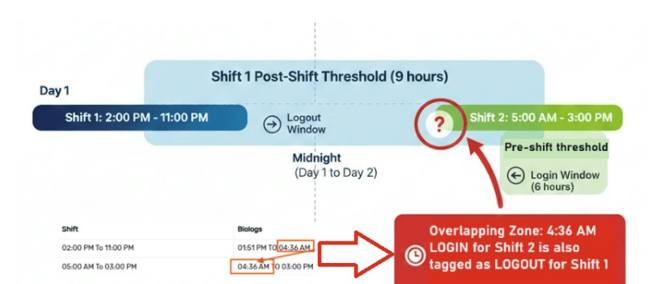
- Shift 1's Post-Shift Window: Using the example of a 9-hour Post-Shift Threshold, the system expects a log to be for Shift 1 if it occurs anytime between 11:00 PM and 8:00 AM the next day.
- Shift 2's Log: The employee clocks in for Shift 2 at 4:30 AM.
- The Overlap: Since 4:30 AM is within the 9-hour post-shift window for Shift 1 (11:00 PM to 8:00 AM), the system prioritizes the longer threshold and incorrectly assigns the 4:30 AM log as the logout for Shift 1, rather than the login for Shift 2.
Impact on Attendance
- Regular Working Days/Attendance: Kindly note that this overlapping of logs has no impact on the employee's attendance status. The employee will be marked Present because valid paired logs exist.
- Payment for Regular Hours: The payment for regular working hours is not affected by this log overlap display
- Overtime (OT) Impact: If the employee files overtime for Shift 1, the incorrect log interpretation becomes a payroll risk. Since the system tags the next day's login (e.g., 4:30 AM) as the logout for Shift 1, the employee's recorded shift end time and thus the OT calculation range might be incorrect. HR/Payroll must manually ensure the overtime range that the employee filed is accurate and does not extend until the time of the login overlap.
To avoid the same issue in the future, you may kindly review your company’s current Pre- and Post-Shift Thresholds: Your team needs to review and potentially reduce the Post-Shift Threshold value for certain shift types to ensure it does not overlap with a possible Pre-Shift Threshold of the next day if needed.
The new value must be less than the shortest possible turnaround time. If you prefer to modify these values, kindly submit a Change Request Form to our Sprout Experts.
Want real-time responses? Explore Sprout Info, your 24/7 guide for product inquiries!