
Decluttering payroll just got easier. With Sprout’s Hide Zero Values feature, line items with “0.00” balances are automatically removed from employee payslips. By displaying only the relevant earnings and deductions for each specific payroll period, you can improve readability and provide your team with a cleaner, more focused breakdown of their take-home pay.
Prerequisite:
Before enabling this feature, ensure that your payslip template is set to Default.
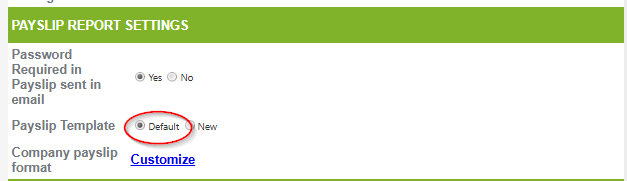
Once you make sure that your Payslip is on Default, you will have to send us a Change Request Form and specify which Feature Flag you want to enable.
Below are the policies you can choose from to Hide the Zero values in the Payslip.
|
Feature Flag |
Description |
|
PayslipHideZeroValues0fAbscenseDeduction |
Hides zero-value for the absence deductions |
|
PayslipHideZeroValues0fAllowanceDeduction |
Hides zero-value for the allowance deductions |
|
PayslipHideZeroValuesOfBasicCompensation |
Hides zero-value for the basic compensation deductions |
|
PayslipHideZeroValuesOfDeMinimisDeduction |
Hides zero-value for the De Minimis deductions |
|
PayslipHideZeroValuesOfEcolaDeduction |
Hides zero-value for the ECOLA deductions |
|
PayslipHideZeroValuesOfHDMFDeduction |
Hides zero-value for the HDMF deductions |
|
PayslipHideZeroValuesOfPhilHealthDeduction |
Hides zero-value for the Philhealth deductions |
|
PayslipHideZeroValuesOSSSDeduction |
Hides zero-value for the SSS deductions |
|
PayslipHideZeroValuesOfTaxDeduction |
Hides zero-value for the Tax deductions |
|
PayslipHideZeroValues0fUndertimeDeduction |
Hides zero-value for the Undertime deductions |
Expected Result:
Once enabled, payslip items with a value of “0.00” will no longer appear in the employee’s payslip.
Want real-time responses? Explore Sidekick, your 24/7 guide for product inquiries!