
Overview
The Employee Data Sync integration automatically synchronizes employee records from Sprout HRIS to Peoplebox, ensuring that employee information, reporting structures, and employment status remain up to date without requiring manual imports or CSV uploads.
Key Features
- Automatic Employee Sync – Employee records are automatically transferred from Sprout HRIS to Peoplebox.
- 15 Employee Fields Synced – Core employee information is maintained across both platforms.
- Smart Deactivation – Employees are automatically marked inactive in Peoplebox when their separation date has passed in Sprout HRIS.
- Daily Synchronization – Employee data is synced regularly to keep records current.
- Monthly Profile Picture Refresh – Employee photos are updated monthly.
Prerequisites
Before enabling the integration:
- Confirm that your organization is subscribed to the Sprout–Peoplebox integration.
- Ensure you have Company Admin access in Peoplebox.
- Identify any employee groups or departments that should be included or excluded from the synchronization scope.
Employee Fields Synced
The following employee data is automatically synchronized from Sprout HRIS to Peoplebox: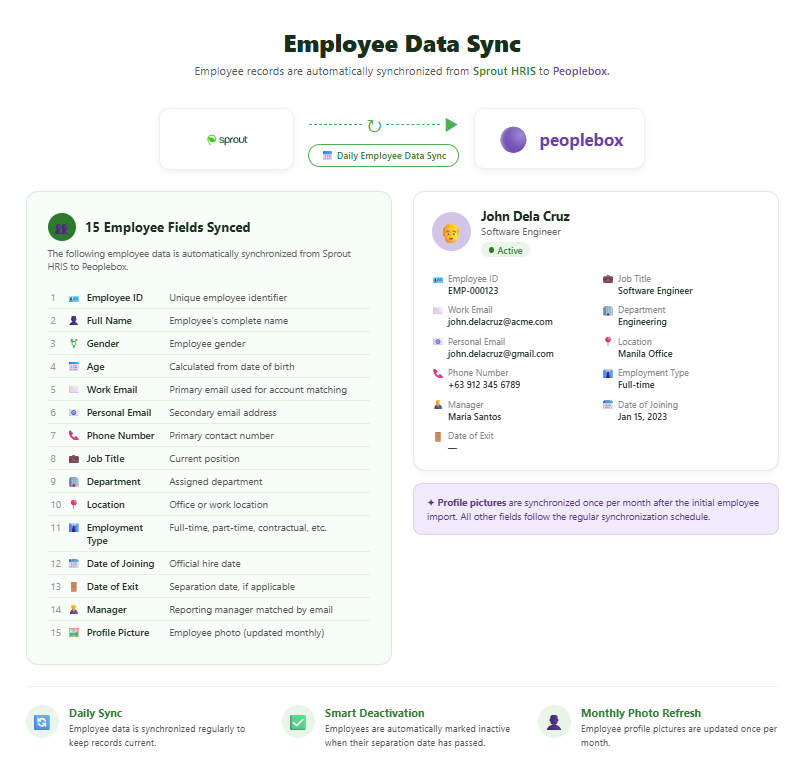 Note: Profile pictures are synchronized once per month after the initial employee import. All other fields follow the regular synchronization schedule.
Employee Status Management
Employee status in Peoplebox is managed automatically based on data received from Sprout HRIS. No manual status updates are required.
Active Employees
An employee remains active in Peoplebox when:
- No separation date exists in Sprout HRIS, or
- A separation date exists but has not yet passed.
Inactive Employees
An employee is automatically deactivated in Peoplebox when:
- The separation date in Sprout HRIS has passed.
- The employee's status in Sprout is Terminated, Resigned, AWOL, or OJT-ended.
- The employee is excluded from active headcount and billing.
- A deactivation timestamp is automatically generated.
Important: Users do not need to manually deactivate employees in Peoplebox. The integration handles this automatically based on employee status and separation date information maintained in Sprout HRIS.
Getting Started
To activate Employee Data Sync:
- Contact your Sprout representative.
- Confirm your subscription to the Sprout–Peoplebox integration.
- Provide Peoplebox Company Admin access for authorization.
- Share any scoping requirements for employee inclusion or exclusion.
The Sprout team will coordinate the necessary back-end configuration and activation.
Frequently Asked Questions
How often is employee data synchronized?
Employee records are synchronized automatically on a regular schedule, while profile pictures are refreshed monthly.
Do I need to manually update employee status in Peoplebox?
No. Employee activation and deactivation are automatically managed based on status and separation date information from Sprout HRIS.
What happens when an employee leaves the company?
When the employee's separation date has passed or their status becomes Terminated, Resigned, AWOL, or OJT-ended in Sprout HRIS, the employee is automatically marked inactive in Peoplebox.
Want real-time responses? Explore Sidekick, your 24/7 guide for product inquiries!