
ReadyCash Access Blocked by 'Complete Payroll Information' Prompt Despite Bank Details Already Saved
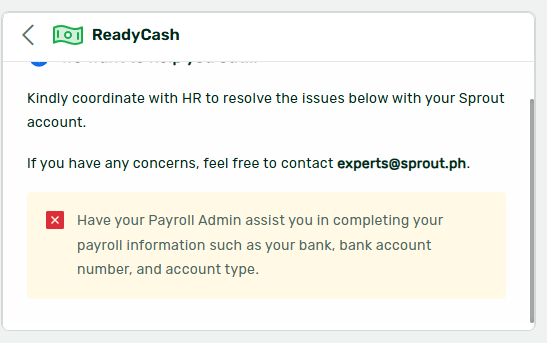
An employee was unable to access ReadyCash because the system displayed a prompt to complete payroll information, even though their bank details were already on file in Sprout HR. The resolution required coordination between the support team and the company's HR or Payroll Admin to verify and complete the employee's payroll setup on the employer side.
Resolution
- Contact your company's HR or Payroll Admin and inform them of the prompt you are seeing. The HR or Payroll Admin must verify and complete your payroll information from the employer side in Sprout HR, as ReadyCash eligibility depends on the employee being fully onboarded with both Sprout HR and Payroll by the employer.
- Confirm that your bank details are saved correctly in your Sprout HR employee profile. If they are present but the prompt still appears, the issue is likely on the employer/payroll setup side rather than the employee profile side.
- If the issue persists after coordinating with your HR or Payroll Admin, reach out to Sprout Support and provide your company name and Sprout HR URL so the support team can investigate further from the backend.
Frequently Asked Questions
Q: Why does ReadyCash keep asking me to complete my payroll information even though my bank details are already in Sprout HR?
A: Having bank details saved in your Sprout HR profile is only one part of the requirement. ReadyCash also requires that your employer has fully onboarded you with Sprout Payroll. If this setup is incomplete on the employer's end, the prompt will continue to appear. Please coordinate with your HR or Payroll Admin to ensure your payroll information is fully configured.
Q: Who is responsible for completing the payroll information required for ReadyCash access?
A: Your company's HR or Payroll Admin is responsible for completing your payroll setup in Sprout. Employees cannot resolve this prompt on their own — the action must be taken by the employer within the Sprout HR and Payroll system.
Q: What should I do if I have already coordinated with my HR Admin but still cannot access ReadyCash?
A: If the issue persists after your HR or Payroll Admin has reviewed your payroll information, contact Sprout Support and provide your company name and Sprout HR URL. The support team can investigate further from the backend to identify any remaining configuration issues.
Got a question or need extra help? Sidekick makes it easy — get answers, raise a ticket, or schedule a call with our experts, all in one place.