
In Sprout Payroll, negative withholding tax may appear in the 1601-C report when prior tax deductions are adjusted, refunded, or when an employee’s taxable income falls below the non-taxable threshold. This article provides guidance on how to review and remove or correct negative tax amounts before filing.
When Does Negative Withholding Tax occur?Negative withholding tax values may appear due to the following scenarios:
- Final pay computation resulting in tax refunds
- Adjustments to previous payroll periods
- Employees falling below the ₱250,000 annual non-taxable threshold
- Manual tax adjustments entered in the system
Impact on 1601-C
The BIR Form 1601-C does not accept negative values. These must be corrected before generating the final report for submission to the Bureau of Internal Revenue.
To remove the negative tax, please follow the instructions below:
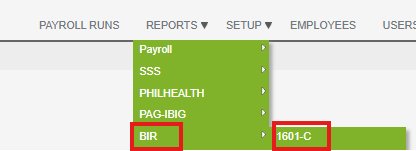
- Go to Reports > BIR > 1601-C.
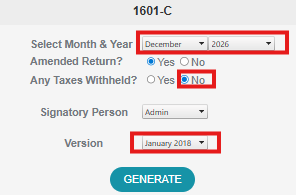
- Select the Payroll Month and Payroll Year, Any Taxes Withheld should be “No” and the version should be 2018.
Want real-time responses? Explore Sidekick, your 24/7 guide for product inquiries!