
Summary
If you run into an error while calling the Sprout API, please include a cURL command that reproduces the issue when you reach out to us. This lets our team run your exact request on our end and investigate right away, instead of going back and forth asking for details.
Why we need this
An error message alone (e.g. "500 Internal Server Error" or "Invalid request") usually isn't enough for us to diagnose the problem. A full cURL command shows us:
- The exact endpoint and HTTP method you called
- The headers you sent (subscription key, content type, etc.)
- The exact request body/payload
- Any query parameters
With all of that, we can reproduce the error on our side immediately, rather than waiting for a follow-up email.
How to get a cURL command for your request
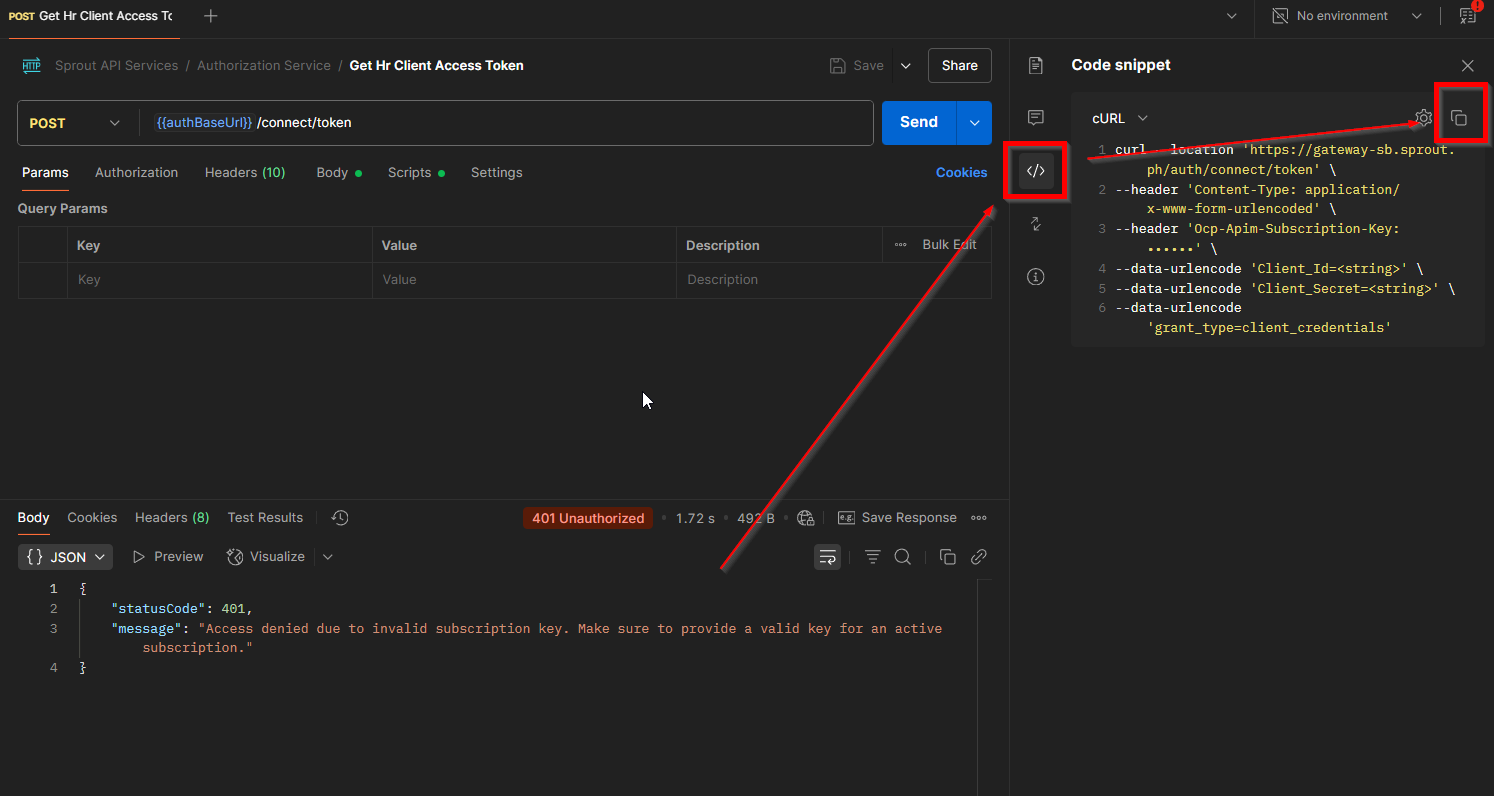
From Postman
- Select the request you sent.
- Click the Code icon (</>) on the right side of the request builder.
- Choose cURL from the language/format dropdown.
- Copy the generated snippet.
Writing it manually If you're calling the API from code, a cURL version of the same request works too:
curl --location --request <METHOD> '<FULL ENDPOINT URL>' \
--header 'Ocp-Apim-Subscription-Key: <YOUR_SUBSCRIPTION_KEY>' \
--header 'Content-Type: application/json' \
--header 'Authorization: Bearer <YOUR_ACCESS_TOKEN>' \
--data '{
"field1": "value1",
"field2": "value2"
}'
Before you send it: please redact sensitive values
Your cURL command will usually contain your Authorization bearer token and subscription key. Please replace those with a placeholder (e.g. <REDACTED>) before pasting the command into a ticket or email — these act like passwords to your account and shouldn't be shared in plain text over a support channel.
If our team needs the live token to reproduce the issue, we'll ask for it through a secure channel separately.
What to include along with the cURL command
To help us investigate as quickly as possible, please also share:
- The exact error message and status code you received
- The timestamp (date and time, with timezone) when the request was made
- Whether the error happens every time or only sometimes
- Any relevant IDs in the request (e.g. Employee ID) so we can trace it in our logs
"I'm getting a 400 Bad Request when trying to update an employee's work schedule. Here's the cURL:
curl --location --request PUT 'https://api.sprout.ph/empservice/api/v1/Employees/{employeeId}/WorkSchedule' \
--header 'Ocp-Apim-Subscription-Key: <REDACTED>' \
--header 'Content-Type: application/json' \
--header 'Authorization: Bearer <REDACTED>' \
--data '{"mondayTimeFrom":"08:30","mondayTimeTo":"17:30","mondayIsRestDay":false}'
This happened today at 9:27 AM PHT, and it fails every time I try."
With this level of detail, our team can usually start investigating.
Got a question or need extra help? Sidekick makes it easy — get answers, raise a ticket, or schedule a call with our experts, all in one place.