
This article explains how to submit payments to Sprout and receive official collection receipts.
1. Official Invoices & Collection Receipts
-
As of March 3, 2025, Sprout operates under the BIR-registered Computerized Accounting System (CAS).
-
All invoices issued via NetSuite are BIR-registered and valid for tax purposes.
-
Collection Receipts are issued once payment clears in the bank or after proof of payment is validated.
🔔 Note: Payment pickup has been discontinued.
2. Accepted Payment Channels
Bills Payment Options
-
UnionBank Business Banking Portal – Select “Sprout Solutions Phil Inc.” from registered billers.
-
AUB Online Bills Payment
-
Required fields:
-
BIN: 20000001
-
Reference: numeric part of Service Invoice No. (remove letters)
-
Example: SI_SSPI00000001 → enter
2000000100000001
-
-
-
-
BDO Business Banking Portal / BDO App – Select “Sprout Solutions Phil Inc.” from registered billers.
-
Easyway Online Payment – Select “Sprout Solutions Phil Inc.” from registered billers.
Bank Deposit / Online Transfer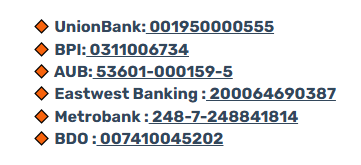
3. Payment Confirmation
After making a payment, please send proof of payment to billings@sprout.ph.
-
Attach BIR Form 2307 (2%, WC120) if applicable.
Want real-time responses? Explore Sidekick, your 24/7 guide for product inquiries!