
Your requests, all in one place.
The My Requests module lets you file attendance requests such as Leaves, CoA, Schedule Adjustment, Overtime, and Undertime directly from the Sprout Mobile App. It functions just like the My Requests module in Sprout HR, giving you a seamless and familiar experience.
My Requests on Mobile
The My Requests module in Sprout Mobile makes it easy to file and manage your attendance requests. You can submit requests for Leaves, Certificate of Attendance (COA), Schedule Adjustment, Overtime, and Undertime — mirroring what you see in Sprout HR.
In addition to filing, you can also:
- View the history of your requests
- Update requests
- Cancel requests
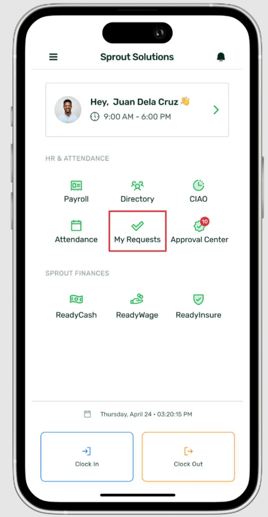
Filing a Request
To file a new request:
- On the My Requests homepage, tap the attendance request type you want to view
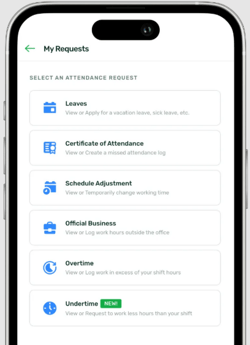
- You’ll be taken to the Request History page for that request, where you can view past submissions and create a new one as shown below:
Request History
When you open a request type, you’ll see your Request History, which is organized into three sections for easier tracking:
- Pending/Resubmitted – Requests that have been submitted but not yet acted on by your immediate supervisor. At this stage, you can still Update or Cancel your request
- Approved – Requests that have been reviewed and approved by your supervisor
- Cancelled – Requests that you have cancelled, as well as those rejected by your supervisor
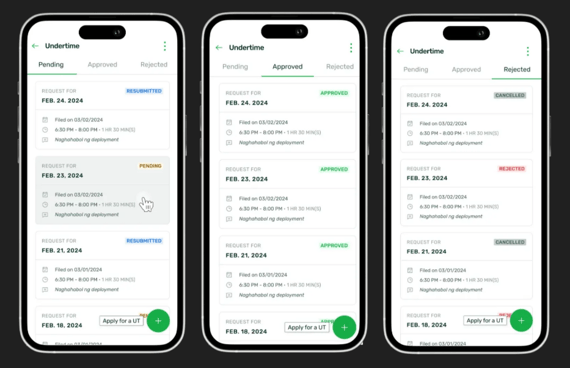
- Tap the plus (+) icon on the lower right
- This will open the application form for your selected request type
Want real-time responses? Explore Sprout Info, your 24/7 guide for product inquiries!