
Overview
This article outlines the recommended troubleshooting steps for resolving the "Access Denied" error when an employee attempts to access Sprout Payroll through a Single Sign-On (SSO)-enabled account. In most cases, the issue is related to the employee's Payroll User Access configuration.
Follow the steps below to verify and refresh the user's Payroll access before proceeding with further investigation.
STEP 1: Verify whether the employee has an assigned Payroll User Access (Payroll Role).Go to your Employee Profile> Current Payroll Information> Payroll User Access, then check if you already added a Payroll Role. Please refer to the sample image below:
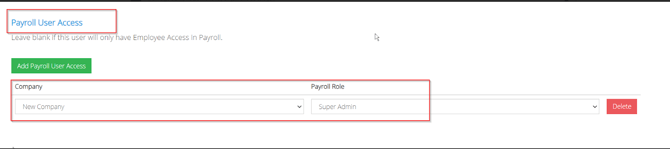
If yes, kindly delete it and Add Payroll User Access again. This refreshes the employee's Payroll access configuration. 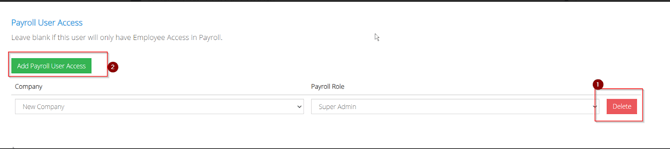
If no Payroll User Access is assigned, add one by following this KB article How to Add a User in Payroll for SSO Activated Accounts.
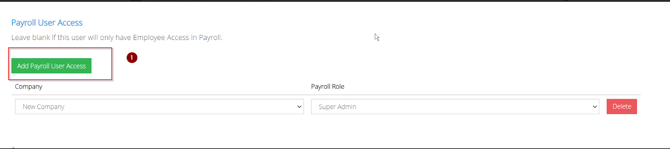
STEP 2: After updating the Payroll User Access, have the employee try accessing Sprout Payroll again via SSO.
Expected OutcomeRefreshing or assigning the correct Payroll User Access should restore the employee's access to Sprout Payroll. If the issue persists after following the steps above, please try other browser like Google Chrome or Microsoft Edge. Perform clear cache before initiating login:
- Are We Clear on Clear Cache? (Google Chrome)
- Are We Clear on Clear Cache? (Internet Explorer/Microsoft Edge)
If the employee still encounters the "Access Denied, please contact Sprout Support via experts@sprout.ph and provide the following information:
- Employee ID or username of the affected user
- A screen recording that shows:
- Login using an Incognito/Private browser window
- The complete login process
- The "Access Denied" error
This information will help the team investigate the issue further.
Got a question or need extra help? Sidekick makes it easy — get answers, raise a ticket, or schedule a call with our experts, all in one place.