
Frequently Asked Questions
What is the team attendance view?
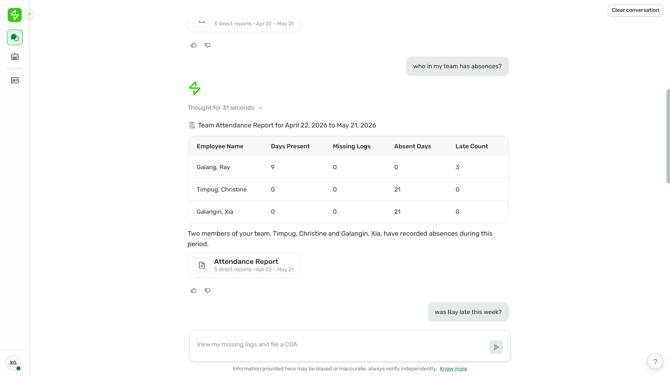
The team attendance view lets managers see their direct reports' attendance — daily logs, schedules, and missing logs — directly in Sidekick, without opening Sprout HR. Ask Sidekick about your team, and it replies with a short summary in chat plus a preview button that opens a side panel with the full report.
Why do I need this?
Checking on your team used to mean logging into Sprout HR and pulling reports per person or per company. With the team attendance view, you can ask a single question in plain language and get a presentable, shareable report covering all your direct reports in one place.
Who can see team attendance?
Team attendance is available when your dashboard type is Manager, and your viewing type is set to Direct reports. When both are true, Sidekick returns data scoped to your own direct reports. If either is not set, Sidekick responds with your personal attendance only, along with the option to file a ticket to your HR Admin.
How do I view my team's attendance?
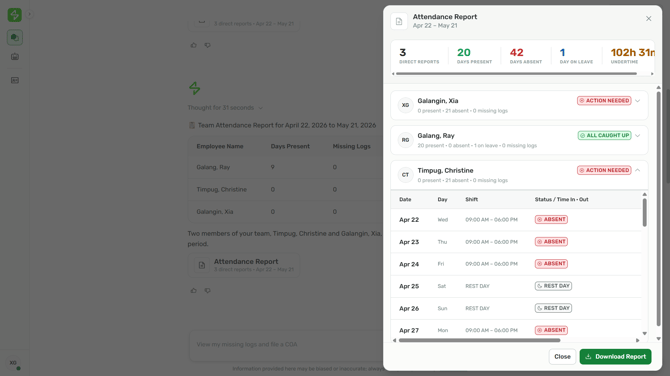
Just ask in chat — for example, "show my team's attendance" for a date range. Sidekick replies with a short summary and a preview button. Opening the preview shows a side panel with each direct report, a status badge of either "ALL CAUGHT UP" or "ACTION NEEDED", and a per-employee breakdown of days present, absent, on leave, and missing logs. Each day is labelled with its status, such as "ABSENT" or "REST DAY".
Can I check just one person on my team?
Yes. Ask for a specific direct report by name — for example, "show [name]'s attendance for [date range]" — and Sidekick filters the view to that one person. If two of your direct reports share the same first name, Sidekick asks you to confirm which one before showing any data.
Can I see my team's schedules and missing logs, too?
Yes. You can ask about your team's schedules for a date range and see assigned and adjusted shifts, and you can ask who has missing logs and for which dates. Everyone on your team appears in these views.
What if I manage people across more than one company?
If you have direct reports in more than one company within the same realm, Sidekick combines them into one unified team view. Everyone appears in the same list regardless of which company they belong to — you don't need to repeat the query per company.
How far back can I look?
You can request up to 180 days of attendance in a single query. If you ask for team attendance without giving a date range, Sidekick defaults to the last 30 days ending on the day you ask.
Why am I only seeing my own attendance instead of my team's?
This happens when the manager's conditions aren't met — your dashboard type isn't Manager, your viewing type isn't Direct reports, or the person you asked about isn't one of your direct reports. In those cases Sidekick returns your personal attendance and offers the option to file a ticket with your HR Admin, rather than showing team data.
Can I approve, edit, or file attendance for my team here?
No. The team attendance view is read-only — it's for reviewing your direct reports' attendance, schedules, and missing logs. Filing, editing, and approvals stay in Sprout HR.
Does this work for dotted-line or matrix reporting?
The team view follows your direct reports list as defined in Sprout HR. Dotted-line or matrix relationships aren't included.
Can I download the team attendance report?
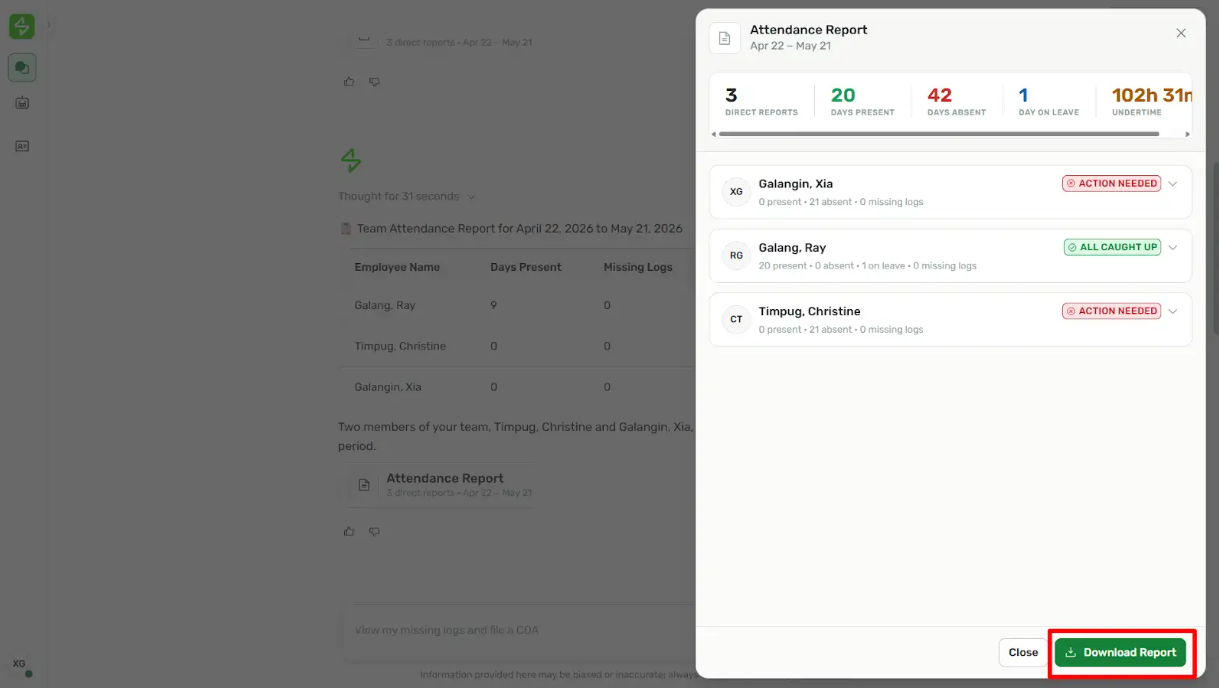
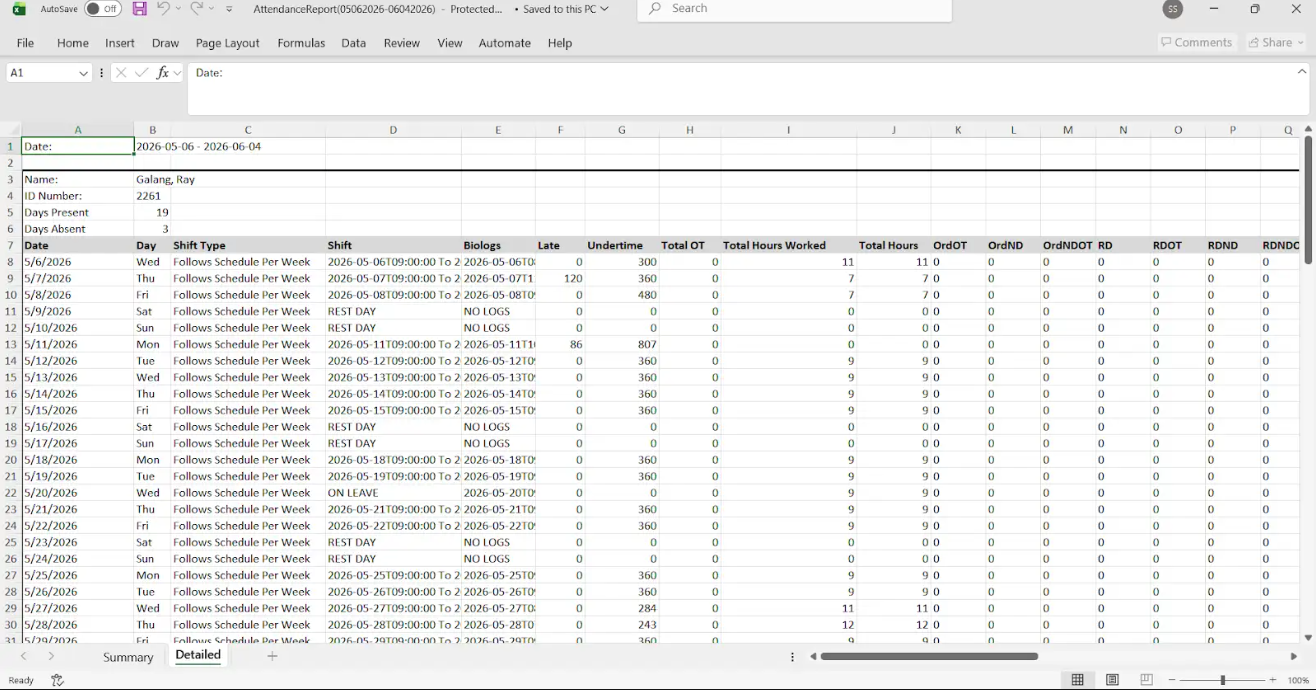
Yes. In the report side panel, click Download Report to download the team's attendance as an Excel file (.xlsx), in the same format Sprout HR exports today — so it drops straight into your existing reporting workflows for payroll, HR, or finance.
Does the download work on mobile?
Yes. The report side panel and the Download Report action both work on mobile, and the file saves to your device.
Why didn't my download work?
The download can fail for a couple of reasons — a connection problem, or a date range with no attendance records at all. Your chat isn't interrupted, so you can adjust the date range and try again.
Want real-time responses? Explore Sidekick, your 24/7 guide for product inquiries!