
The Basics
What does the Teamtailor integration do?
New hires flow into Command Centre automatically. It's a one-way push from Teamtailor into Command Centre, fired at the moment of hire. When your recruiter marks a candidate as Hired, Teamtailor sends that person's basic details straight across — first name, last name, email and start date — and Command Centre creates an onboarding record for them, labels it as coming from Teamtailor, and emails your HR admins a link that opens the record ready to review. Nobody re-types what your recruiter already captured.
The Hired stage isn't the only route. Your recruiters can also send a single candidate across on demand, straight from that candidate's card, without waiting for a stage move — useful for a one-off, or to check the setup works.
From there the flow is: your admin checks the details and sends the onboarding invite → the new hire uploads their documents and ID numbers through their secure link → your team reviews and approves them → an admin clicks Activate → the employee record is created in Sprout HR.
How do we switch it on?
Two parts, in two places. In Command Centre there's nothing for you to install — once you're subscribed we enable the integration for your workspace, and Teamtailor appears under Integrations in My Apps with nothing for your IT team to host or configure.
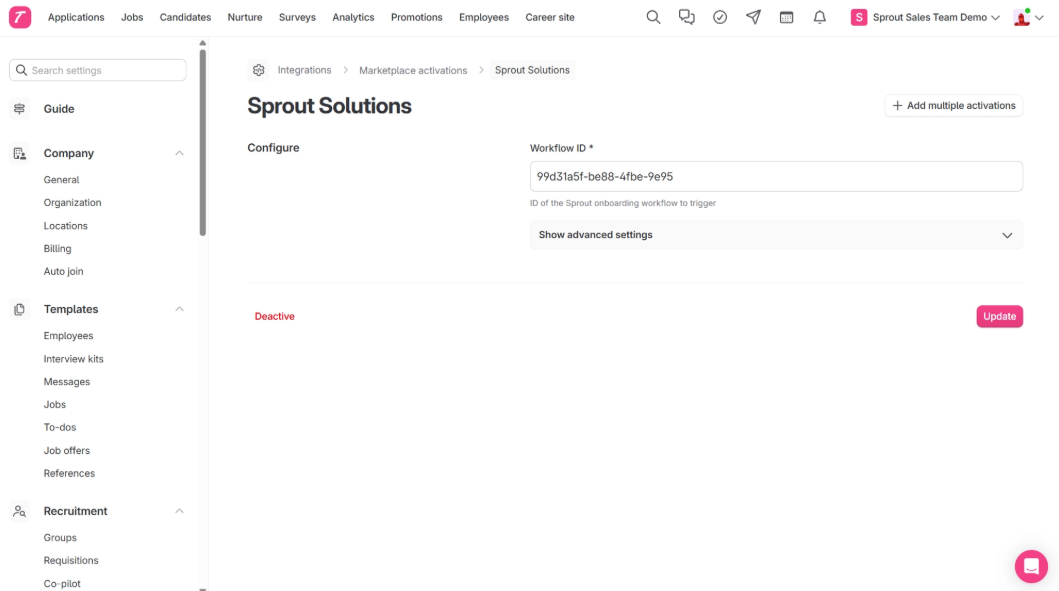
In your own Teamtailor account there's a short one-time setup: entering a Workflow ID unique to your company, mapping the Teamtailor fields you want carried across, and adding a trigger on your Hired stage so the hand-off fires. It isn't quite plug-and-play, but it's a handful of settings done once — we give you the values you need and stay with you through it.
The steps are written up in Teamtailor Integration — Setup, screenshot by screenshot. Your Sprout contact will walk you through it when we enable your workspace.
We run several companies. Can one Teamtailor account cover them all?
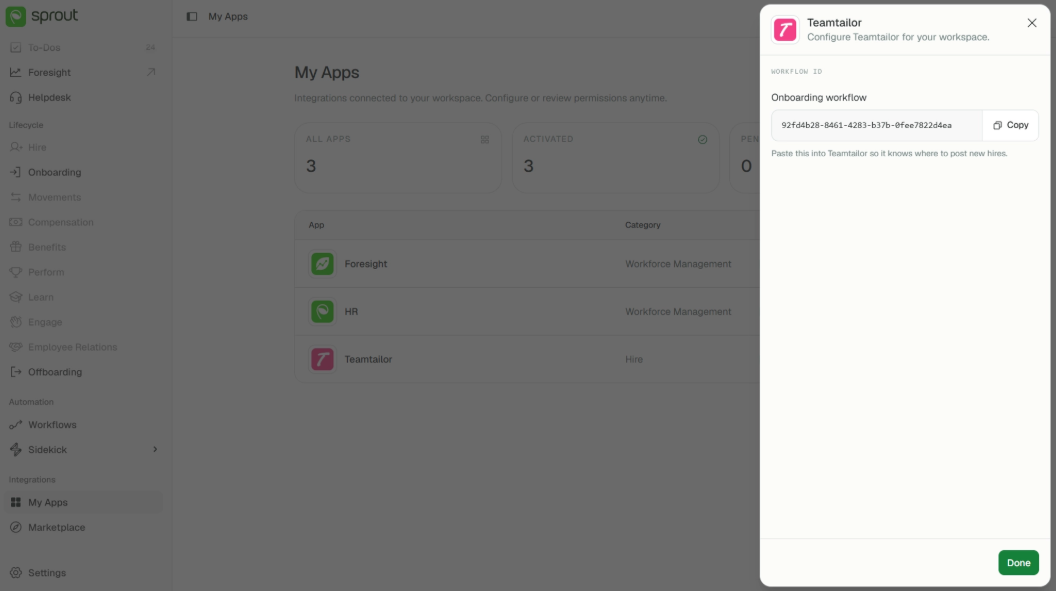
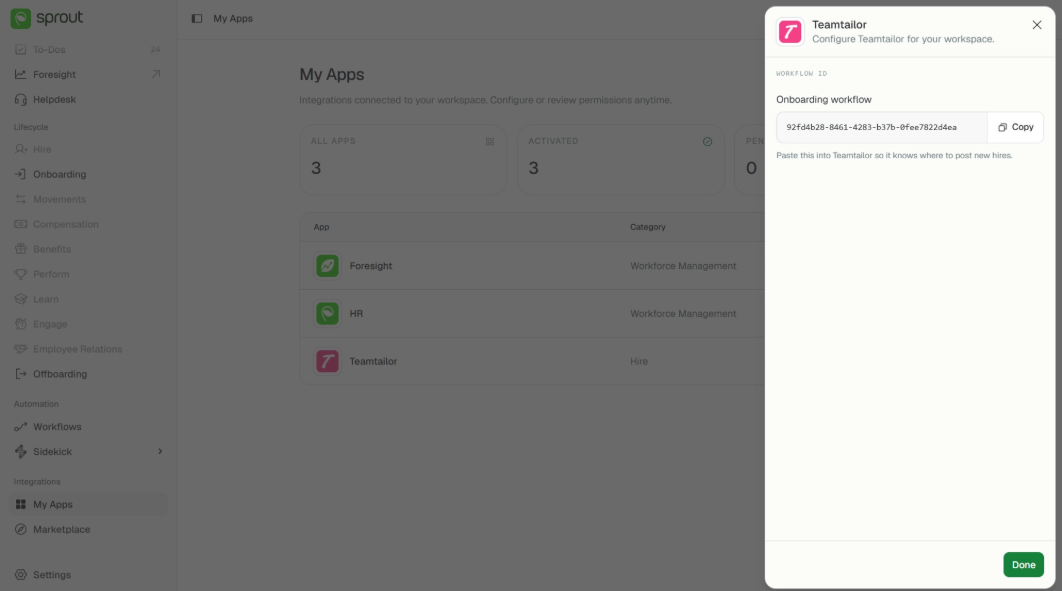
Yes. Each of your companies has its own Workflow ID — copy each one from Command Centre while you're in that company — entered in the Teamtailor workspace that company recruits from — so hires from each workspace reach the right company in Command Centre. A single hire always lands in exactly one company, never spread across several.
How quickly does a hire appear?
Usually within five minutes.
Does this change how we onboard?
Only the typing. A Teamtailor-sourced record runs through Command Centre onboarding exactly as one you create yourself does — same checklist, same secure upload link, same reminders, same verification, same activation into Sprout HR. Worth being clear that this means the Command Centre onboarding workflow, not the onboarding process you used before it: Teamtailor doesn't add or alter a single step in it, it only takes the typing out of the front.
When a Hire Arrives
How do we know a new hire has come through?
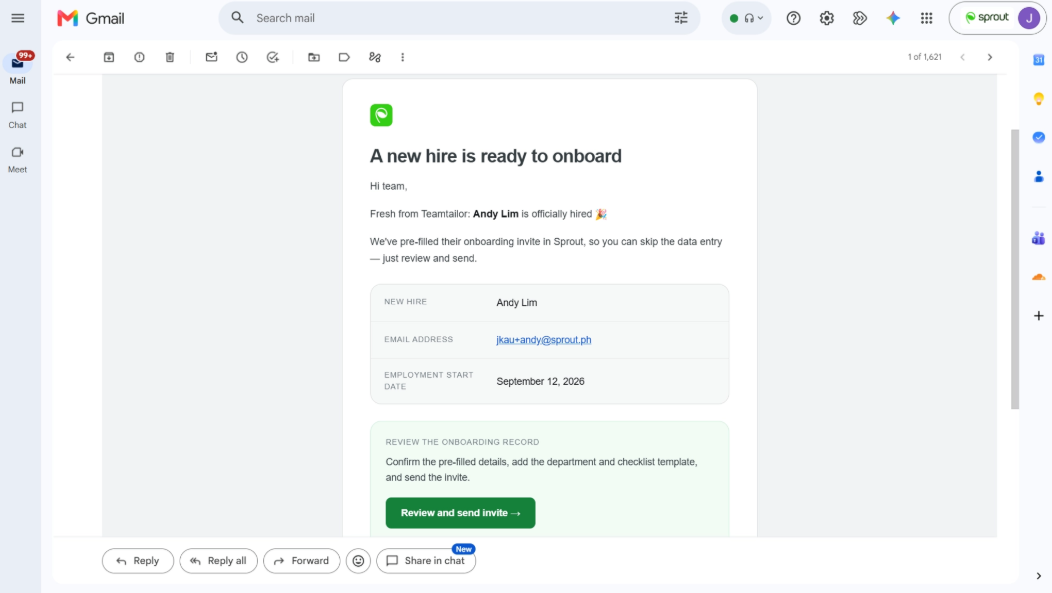
Your HR team gets one email per new hire. It names the person and links straight to their record with the invite already open for review — not to the list for you to go hunting. Everyone with onboarding access receives that same email, and any of them can act on it.
Is the onboarding invite sent automatically?
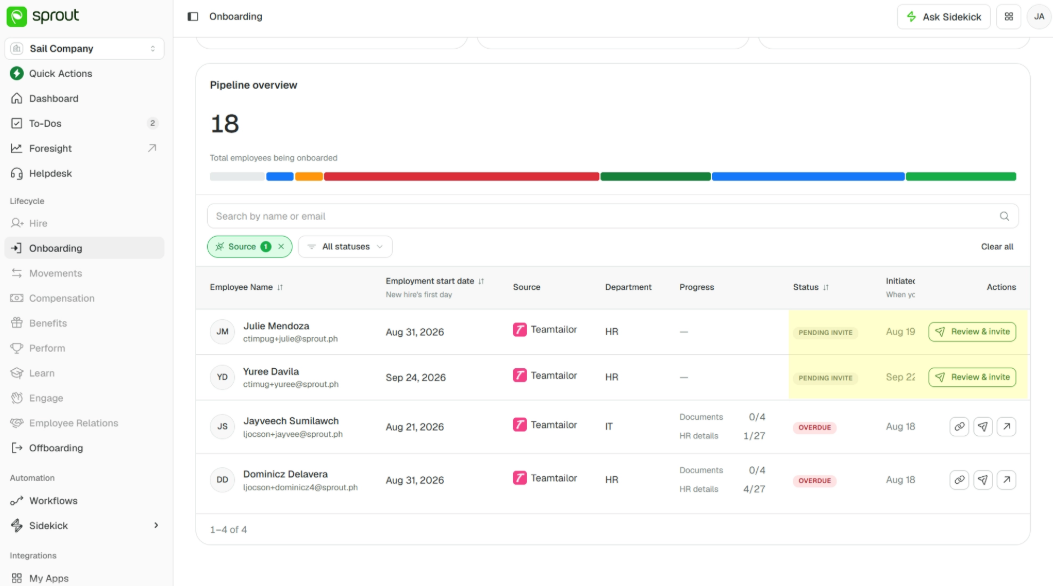
No, and that's deliberate. The record arrives as Pending invite and waits for you. You review what Teamtailor sent, choose the checklist the new hire should complete, confirm their department — pre-filled if you've mapped it — and send. The new hire hears nothing until you do.
What's already filled in for us?
On the invite: first name, last name, personal email, start date, and — where you've mapped it — the department. All editable.
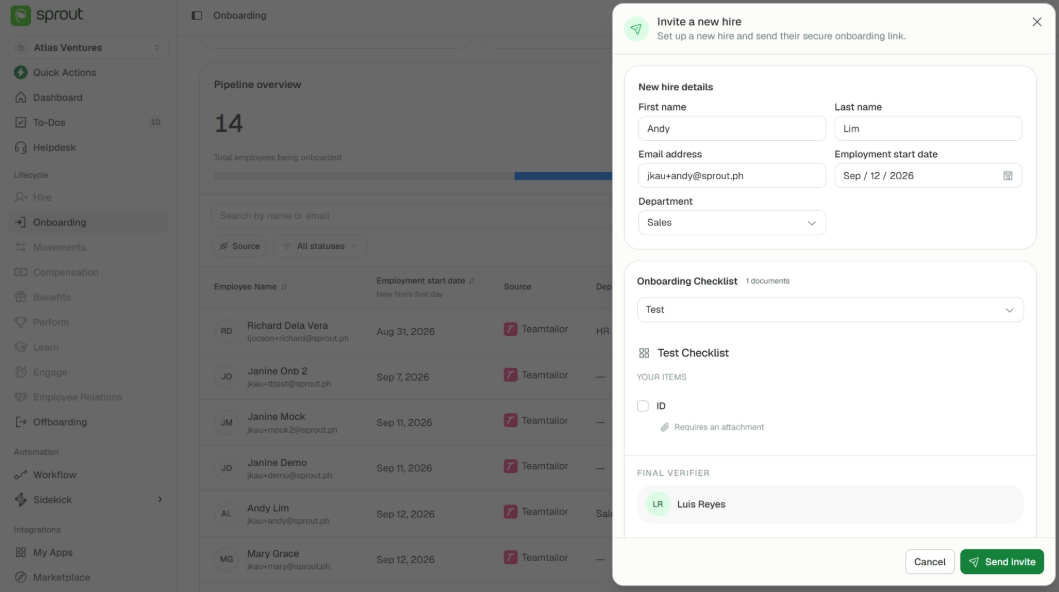
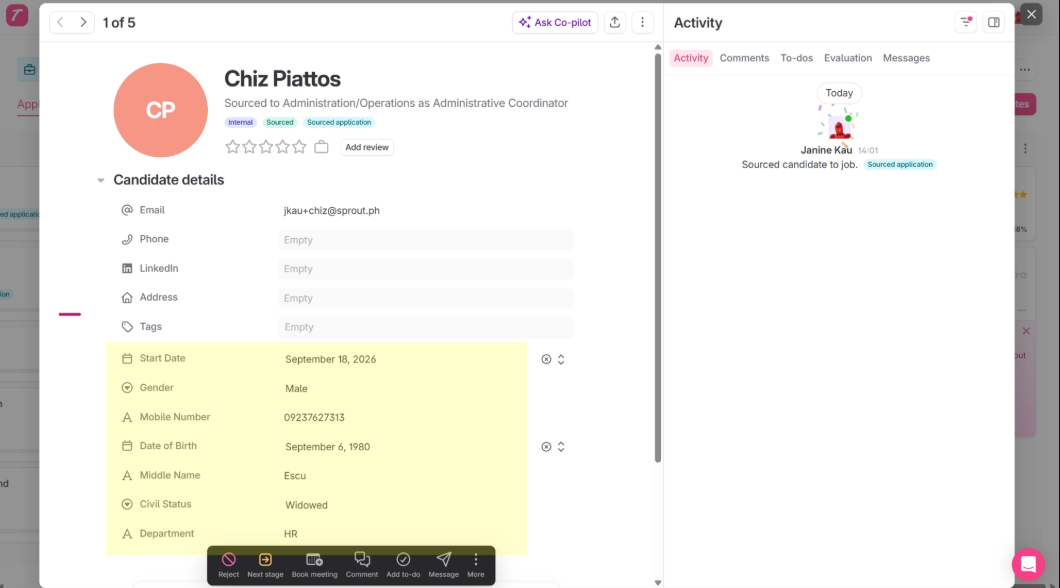
Teamtailor can send more than that, but only fields Sprout HR needs for the employee record, and only the ones your Teamtailor account has been mapped to send. Anything unmapped arrives blank. The rest appear later on the activation screen, since they aren't needed to send an invite. Teamtailor Integration — Setup lists exactly what can be mapped — and job title comes across on its own, with no mapping needed.
One thing Teamtailor never sends is a checklist template — that's always your choice. A department can come across if your Teamtailor is mapped to send it; if it isn't, you pick one. Either way both have to be set before the invite can go out.
What happens later, at activation?
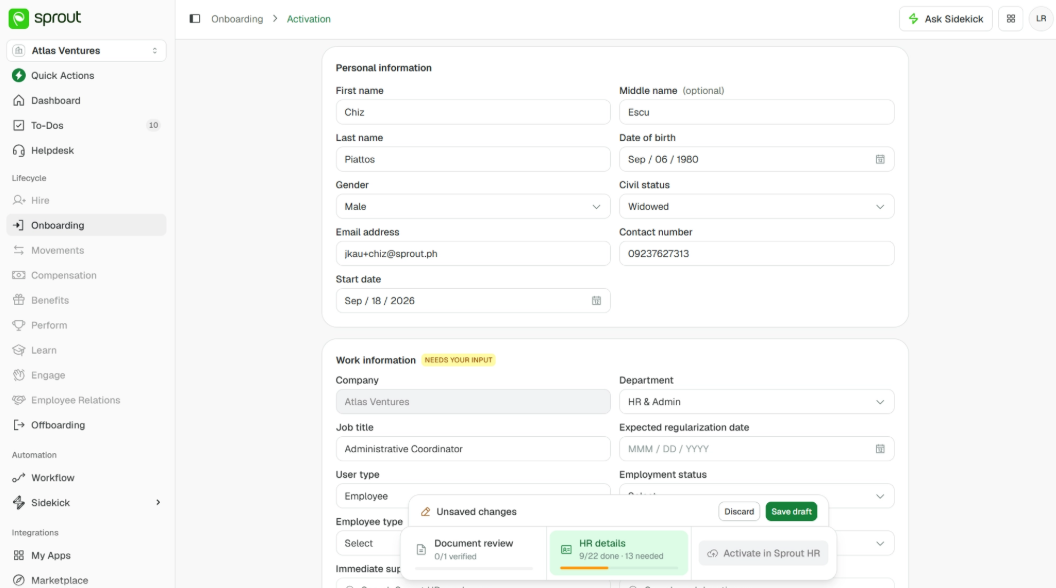
The rest of what Teamtailor sent shows up here, pre-filled; anything it didn't send is blank for you to complete. Everything stays editable, and if you corrected a value on the invite, that's the value you'll see rather than the original.
The screen is still yours to finish — the details your team owns, like the new hire's biometric ID, their Sprout HR user level, their schedule and their supervisor. Company is fixed to the Sprout HR company the record arrived into, and the login name is generated by Sprout HR.
Do these hires behave differently anywhere else?
No. Reminders, the upload portal, verification, waiving, activation — all identical to a record your team creates in Command Centre itself. The only difference is where the record came from.
Telling Them Apart
How do we see which hires came from Teamtailor?
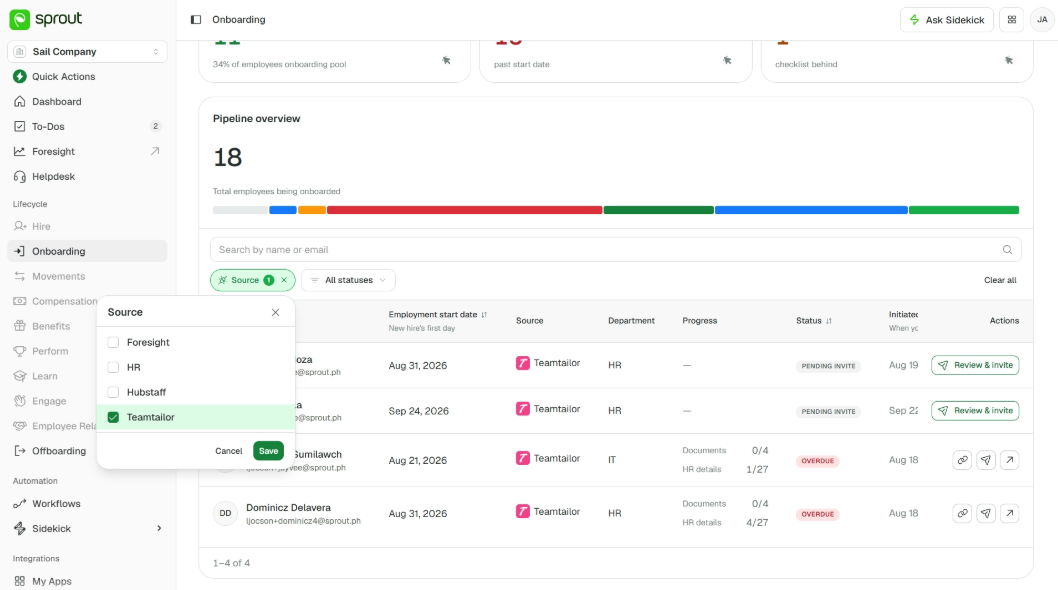
A Source column on the onboarding list shows Teamtailor or HR — HR meaning someone created the record in Command Centre directly. You can filter the list by source to look at one group on its own. They sit in the same list either way; there's no separate queue.
When Something Doesn't Look Right
A candidate was marked Hired but no record appeared. What should we check?
Start in Teamtailor, since that's where the likeliest causes sit.
- Is the trigger on your Hired stage still in place? — the hand-off fires from there, and without it nothing reaches us at all.
- Does the integration still hold the Workflow ID we issued you? If you run several companies, check the workspace holds the Workflow ID for the right one — a mismatch lands the hire in a different company rather than nowhere.
- And was the candidate actually moved to Hired, rather than only offered?
- If the trigger turns out to be missing, you don't have to move the candidate through the stage again — add the trigger, then send that person across by hand from their card.
Then in Command Centre:
- Is the record genuinely absent or just out of view — check the full onboarding list, including Pending invite.
- Does a record already exist for that email address? We keep one active onboarding record per email and a second hire under the same address is turned away rather than duplicated.
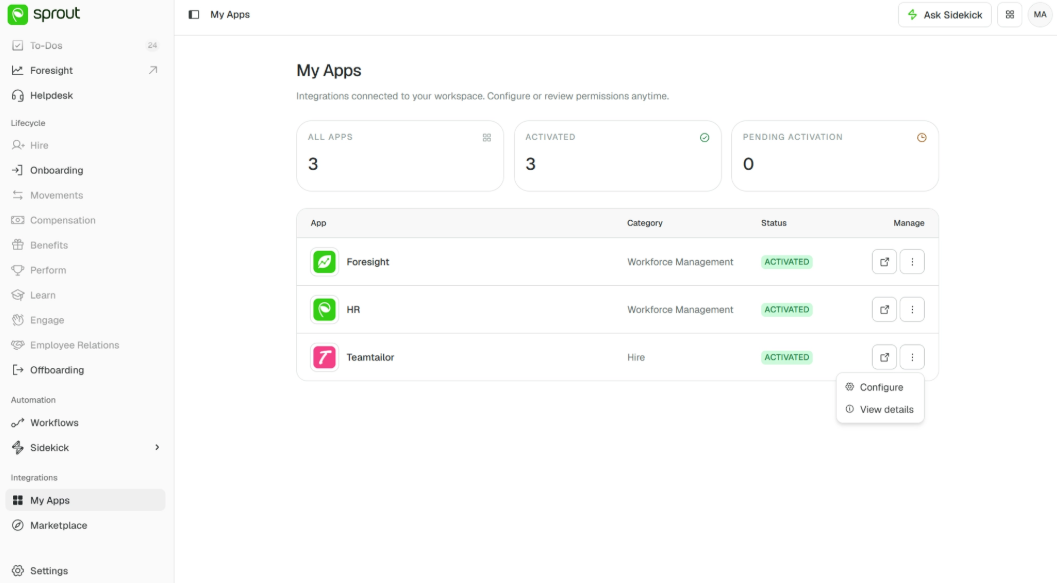
If none of that explains it, contact Sprout Support with the candidate's name and email. What we can tell you is whether the hire ever reached us — and that settles which side to look at. If it did, we can say what became of it. If it didn't, the answer is somewhere in your Teamtailor setup, which we can't see from here. You can re-copy your Workflow ID at any time from My Apps → Teamtailor → ⋮ → Configure, and your Sprout contact can confirm the integration is active for your workspace.
The integration was switched off. What happens to hires already in progress?
They carry on as normal — review, invite, activate, all still available. That holds either way: whether the activation was deactivated on your side in Teamtailor, or the app was switched off for your workspace on ours. Switching it off only stops new hires arriving.
Could a hire be lost if something is briefly down at Sprout?
No. If we can't file the record the moment it arrives, we hold the event and retry rather than dropping it. Teamtailor doesn't need to send it again.
What if the details Teamtailor sends are incomplete?
A hire needs a first name, last name, email and start date to come through. If one is missing, no record is created and the event is rejected rather than half-filed.
Start date is the one worth double-checking. It reaches us through the field mapping rather than automatically — so if it hasn't been mapped in Teamtailor, every hire is turned away as incomplete, with nothing on screen to tell you why.
Contact Sprout Support and we'll tell you what arrived and why it was rejected.
What This Release Doesn't Cover
Do you support other applicant tracking systems?
Teamtailor is the one connected in this release. Others each need their own integration.
Does anything flow back into Teamtailor?
No — the connection is one-way. Onboarding progress, verification and activation stay in Command Centre; offers, rejections and everything before "Hired" stay in Teamtailor.
Someone we hired isn't joining after all. Does Teamtailor tell you?
No. If it changes in Teamtailor, delete the new hire's record in Command Centre yourself once you're sure — it's the same delete as for any other new hire, so you'll see what's removed and confirm before it goes.
Someone we hired before is coming back. Does that come through?
Re-hiring a person who was previously onboarded and later offboarded isn't handled by this connection. Set them up as you would today.
Can our recruiters see the onboarding in Command Centre?
Not through the integration — it carries the hire's details across, not any access along with them. Whether a particular recruiter sees onboarding is your call: give them a Command Centre account with onboarding access and they'll see it like any other admin, and if you use single sign-on it's the same login they already have. Without that account, they stay in Teamtailor.
Can we monitor the health of the connection ourselves?
Not today; we monitor our side of it. If you think hires have stopped arriving, contact Sprout Support.
Getting Help
Questions about setting up or keying the integration go to your Customer Success Manager. If a hire hasn't arrived or a record looks wrong, contact Sprout Support with the candidate's name and email — we can confirm whether the hire reached us and what happened to it. We can't see inside your Teamtailor workspace, so anything that never left Teamtailor is one for your own team, or for Teamtailor's support.
Got a question or need extra help? Sidekick makes it easy — get answers, raise a ticket, or schedule a call with our experts, all in one place.