
Ever wondered why a manager sometimes can’t see certain approved applications in their Approval Center, even though they’ve been processed? Let’s take a closer look at how dashboard types affect what users see and manage.
Example Scenario
Ms. Jacqueline, a manager in your organization, noticed that some approved applications of employees aren’t appearing in her Approval Center. She was expecting to see all applications submitted by employees under her company, but only the requests from her direct reports are visible.
Key Differences: Manager vs. Admin Dashboard
The visibility of applications in both the Approval Center and Resolution Center depends on the type of dashboard assigned to a user, not simply on the viewing permissions within the user’s Dashboard.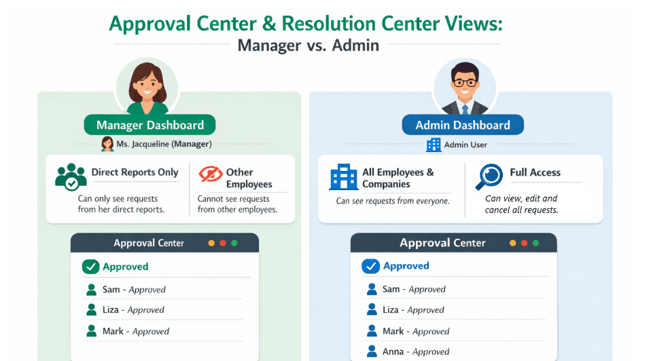
- Manager Dashboard:
- Can view and manage requests only from direct reports.
- Approved applications from other employees outside their reporting line will not be visible.
- Can view and manage requests only from direct reports.
- Admin Dashboard:
- Has full visibility across all employees and companies.
- Can view, edit, and cancel applications or requests from any employees.
- Has full visibility across all employees and companies.
You may also visit this article: What Are the Different Dashboard Types?
What This Means for Ms. Jacqueline
Because Ms. Jacqueline has a Manager Dashboard:
- She will only see approved applications submitted by her direct reports.
- Applications she approved from other employees will no longer appear in her Approval Center
Additional Information:
Q: Will changing a user’s Employee Viewing (What Is Employee Viewing? (Access Levels) on Access Level affect what the user can see in the Approval Center and Resolution Center?
A: No. Changes to a user’s Employee Viewing on the Access Levels will apply to all pages in the Sprout HR except the Approval Center and Resolution Center, where cross-company approvals are present. Their view in these centers remains determined by their dashboard type, not their Access Level settings.
We value your feedback! If your organization would like approvers to view approved applications based on their overall access level rather than just their direct reports, this functionality would be considered a system enhancement.
You may coordinate this with your Sprout Customer Success Manager, who can raise this as a feature request with our Product team for review and consideration for future system updates.
Want real-time responses? Explore Sidekick, your 24/7 guide for product inquiries!