
In the 13th month payroll run, the system may automatically assume amounts for certain periods based on the selected coverage dates (From and To) as well as the actual payroll runs processed for the employee(s). This commonly happens when an employee is missing a payroll run or when a payroll run has not yet been processed because the covered periods have not yet reached their regular payroll cycle at the time the 13th month was generated.
How Assumed Amounts Work:
1. When the system does not create assumed payroll runs
For the 'Advanced' computation type, the system checks whether any actual payroll run exists after a missing payroll period.
-
If a later payroll run is found, the system interprets this as confirmation that payroll has already progressed.
-
As a result, no assumed amounts are created for earlier skipped periods, because the system considers those gaps as intentionally omitted.
Example:
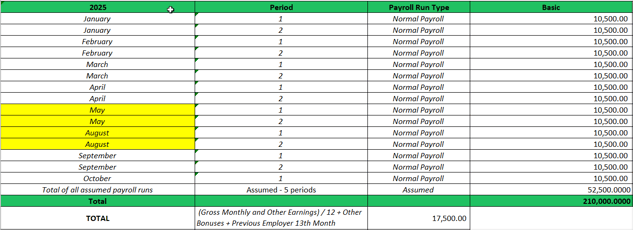
In the screenshot below, the system skipped June and July and did not assume any amount because an August payroll run had already been processed for the employee.
Note: For the ‘Current/Full Salary’ computation type, the system uses the latest basic salary recorded in the employee profile for all applicable months within the coverage. This applies even if the employee has no processed payroll runs for those periods—the system will still use the latest basic salary to compute the 13th month pay.
2. When the system does create assumed payroll runs
If a payroll period has no processed run and there is no subsequent payroll run after it, the system treats that period as still pending.
Since there is no indicator that payroll has moved forward, the system assumes the payroll run has not been processed and may generate an assumed amount for that period.
Example:
Using the same case above—given that the 13th month coverage is for the full year—the system assumed amounts equivalent to five periods (October Period 2 to December Period 2), because the last processed payroll run was October Period 1.
Employee Not Included in the Payroll Run (e.g., on Leave)
What if the employee was not included in the payroll run due to leave, and the system assumed an amount because there was no subsequent payroll run?
In this situation, you will need to create an Adjustment Run to offset the system-assumed amount for the payroll periods the employee did not actually have.
How to Correct Assumed Amounts Steps:
-
Create an Adjustment Run and set both Government Contributions and Tax to “No.”
-
Upload an adjustment using either:
-
an adjustment type already included in your 13th-month pay setup (e.g., basic salary adjustment), or
-
an unused adjustment type if no adjustments are currently part of the setup. Make sure to tick/select that adjustment type in the 13th-month pay setup.
Then upload a negative amount equivalent to the assumed period.
Example:
If the employee was excluded from the payroll runs for October Period 2 to November Period 2, and the system incorrectly assumed amounts for these 3 payroll periods, you should upload a one-time adjustment of –31,500.00. -
- Create and process the 13th-month payroll run for the employee.
- After the 13th-month payroll is finalized, delete the Adjustment Run created earlier to ensure it is not included in your payroll reports.
Managing 13th-month computations can be complex, especially when payrolls are incomplete or processed early. Following the guidelines outlined above will help you control assumed amounts and maintain accurate results.
Want real-time responses? Explore Sprout Info, your 24/7 guide for product inquiries!