
It can be confusing when you’re looking for a specific Feature, and it’s not where you expect it to be.
In Sprout HR, the reason you can’t find "Attendance Manager" under Access Levels is that the setup is under Attendance Management, as it is the prerequisite for the Attendance Manager. Currently, access to Attendance Management and Attendance Manager cannot be separated; it will be enabled/disabled at the same time.
To ensure that you have access to both modules in Sprout HR, here are the steps:
STEP 1: Go to Sprout HR> Maintenance Tab> Access Level: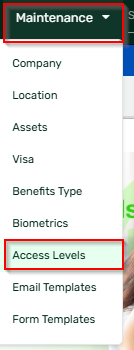
STEP 2: Select the Access Level you have to update, then go to the Navigation Access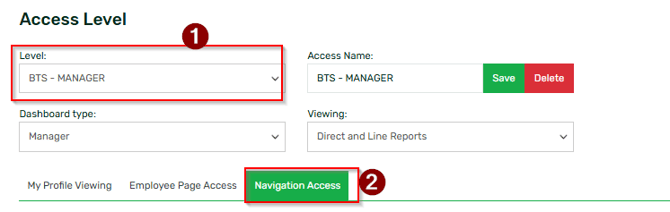
Then, scroll down your screen to find the Attendance Management setting.
STEP 3: Tick/Check the box for the access you want to grant to the Users of the Access Level selected.

Don't forget to click save once done!
Want real-time responses? Explore Sprout Info, your 24/7 guide for product inquiries!