
This article outlines the necessary verification steps to ensure holidays are correctly recognized by the system, preventing unauthorized deductions from employee leave balances.
Ideally, holidays are bypassed during the leave filing process to preserve an employee's leave credits. If you observe that a holiday is being treated as a billable leave day, it is likely due to specific configurations in the employee’s profile or the company’s holiday settings that override the default non-working status
What to Check?
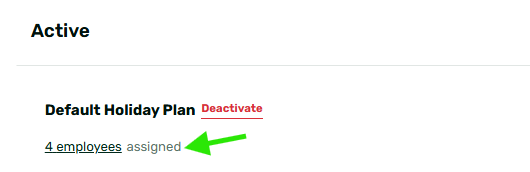
1. Holiday Plan Assignment
The most common culprit is a missing link between the employee and the holiday calendar. If an employee isn't assigned to a Holiday Plan, the system won't know which dates to exclude from their leave, treating the holiday as a regular working day.
- How to check: Go to Maintenance Tab > Company > Holidays. Select your holiday plan and ensure the affected employee is added or assigned to it.
2. Holiday Status (Enabled vs. Disabled)
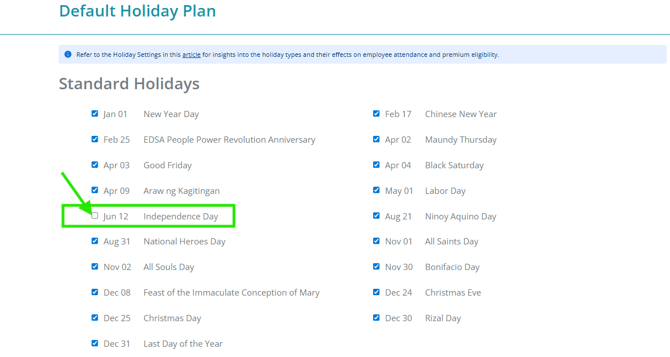
If the issue is affecting all employees assigned to the same holiday plan, the holiday might be listed/added in your Holiday Plan settings but isn't actually "active." If a holiday is added but the checkbox is left unticked, it won't be recognized by the system as non-working day.
- How to check: Go to Maintenance Tab > Company > Holidays. Select the holiday plan and check if the affected holiday date is ticked or enabled.
See sample below:
You may also visit this related article: Why Holiday Isn't Reflecting In The Attendance Report Even If It Was Already Added In The Holiday Settings?
3. Approved Schedule Adjustments
An approved Schedule Adjustment can override general holiday rules. If an employee has a schedule adjustment covering the holiday date that tags it as a "Working Holiday," or just a “Regular Working day,” the system will allow them to file a leave for that day because it expects them to be at work.
- How to check: Check if the employee has an approved Schedule Adjustment that includes the holiday date.
You may also check How to Edit an Approved Leave Application or How to Delete Specific Schedule Adjustment Application Date if it's within a Date Range?
4. Holiday Type Settings
Not all holidays are automatically "rest days." If a holiday is specifically set as a Mandatory Working Holiday, the system requires the employee to be on duty. In this case, the system allows paid leave to be filed because it is considered a required working day.
See sample below: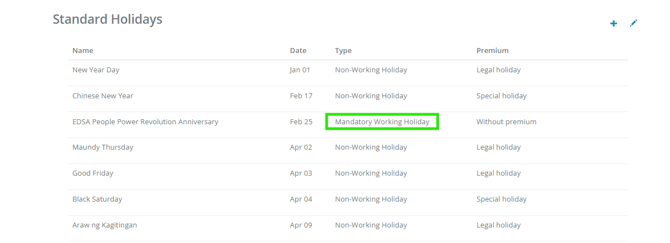
- How to check: Navigate to Maintenance Tab > Company > Holidays > Settings and verify the Holiday Type.
You may also check these related articles:
If a holiday is deducting leave credits, it's usually because the system hasn't been told that specific employee is "off/non working." Reviewing your Plan Assignments and Holiday Types will typically resolve the issue.
Want real-time responses? Explore Sidekick, your 24/7 guide for product inquiries!