
This article provides the required pre-requisites and important guidelines when processing Final Pay for Daily Paid (Part-Time) employees in Sprout Payroll.
Pre-Requisites for Final Pay ProcessingBefore creating a Final Pay run for a Daily Paid employee, please ensure that the following conditions are met:
1. Employee Must Have an Existing Part-Time Payroll RunThe employee should already have an existing Part-Time payroll run in the system prior to processing Final Pay.
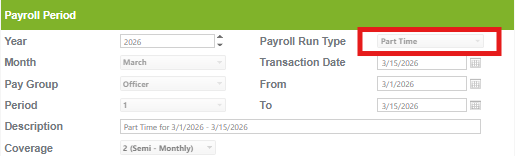
2. Employee Should Not Have an Existing Final Pay – Part-Time Run
Currently, the system only allows one (1) Final Pay run for Part-Time employees.
If a Final Pay – Part-Time payroll has already been created for the employee, the system will no longer allow another Final Pay run.
3. Employee Status Date Must Fall Within the Payroll Period
The employee’s Status Date in the Employee Profile should fall within the:
- Payroll From Date
- Payroll To Date
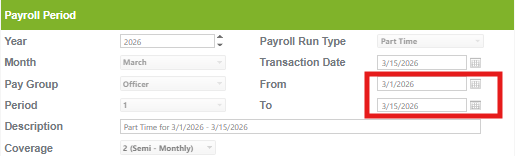
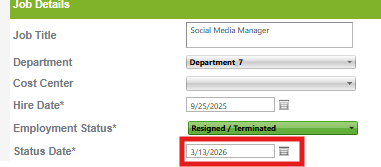
This is required for the employee to be included in the Final Pay payroll run.
How to Validate Existing Payroll Runs
You may use the Year-To-Date (YTD) Report to verify the following:
- Existing Part-Time payroll runs
- Existing Final Pay – Part-Time payroll runs
This helps confirm whether the employee is still eligible for Final Pay processing.
The employee already has an existing Final Pay – Part-Time run but does not have an existing regular Part-Time payroll run.
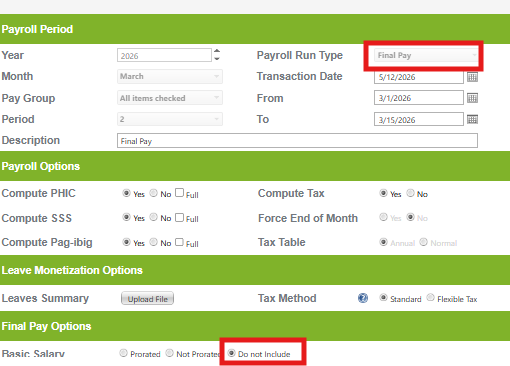
In case the Employee has Final Pay Part-time and no existing Part-time run, you can use the Final Pay run and exclude the Basic and other salary. Then manually upload the expected salary via one time adjustment: How to Process Final Pay in Sprout Payroll?
Want real-time responses? Explore Sidekick, your 24/7 guide for product inquiries!