
Overview:
Annualization must be processed first prior to generating the Alphalist and BIR 2316.
Annualization corresponds to the final payroll run of the year:
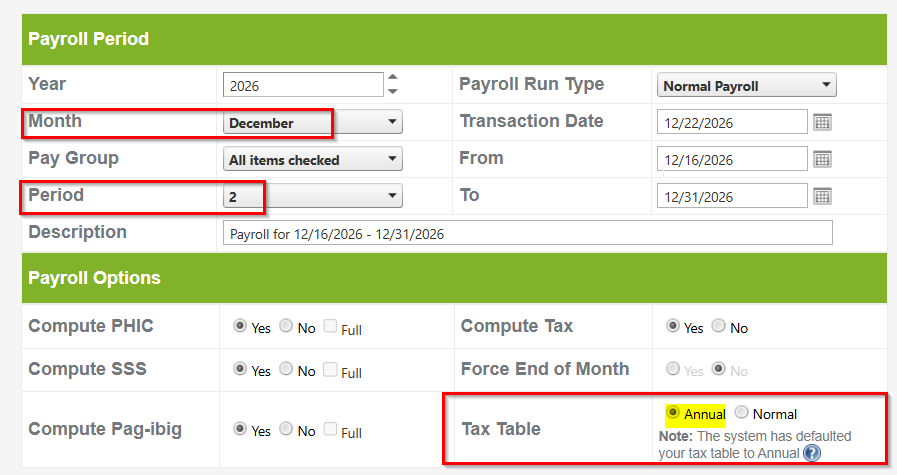
- Semi-Monthly: December Period 2 Payroll Run
- Monthly: December Period 1 Payroll Run
- Weekly: December Period 4 Payroll Run
Step-by-Step Process
Step 1: Prerequisites (Before Annualization)
- New Hires: Upload the BIR 2316 provided by their previous employer for employees hired within the current calendar year. Synced Accounts: How to Add Previous Employment Details in the Alphalist?
- Mid-Year Payroll Setup: Upload Year-To-Date (YTD) figures if payroll processing began mid-year. How to Upload YTD
Step 2: Processing Annualization
- Ensure the payroll run being processed is the final run for the year.
- Initiate the payroll run.
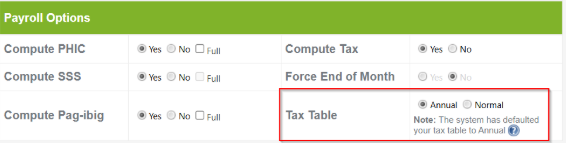
- In the Payroll Options section, verify that the Tax Table field defaults to Annual.
Step 3: Post-Annualization & Reporting
- Generate Annualization Report: Check Column L of the report. The value must be zero. If a value is present, follow the required workaround for tax payable/refund discrepancies. Why is there an amount under Tax Payable or Tax Refund Column of Annualization Report?
- Generate and Validate Alphalist: Run the Alphalist report and validate the data using the official BIR Validation Tool. Update: Alphalist 7.4 in Sprout Payroll / How to Download Alphalist Data Entry and Validation Module (Version 7.4)
- Generate BIR 2316: Once validation is complete, proceed with generating the BIR Form 2316. How to Post BIR 2316 in Sprout Payroll? / How To Generate BIR Form 2316 from Sprout Payroll
Got a question or need extra help? Sidekick makes it easy — get answers, raise a ticket, or schedule a call with our experts, all in one place.