
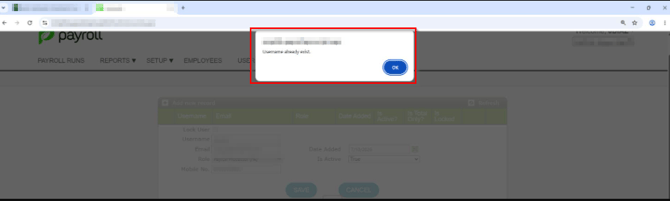
When attempting to set up a user's access to Sprout Payroll, the system displays a "User Already Exist" error message—even though the user is not visible or listed in Sprout Payroll.
Cause
For accounts with Single Sign-On (SSO) activated, user access is managed through the integration between Sprout HR and Sprout Payroll.
This error occurs because the employee’s username or email address is already assigned to an existing account in Sprout HR (such as another employee record or an existing admin account). Because the credential is already registered in Sprout HR, the system blocks the payroll setup to prevent duplicate account conflicts.
Step 1: Search Sprout HR for Duplicate Accounts
- Log in to Sprout HR with an administrator account.
- Go to Admin Tools > Employee Information > Edit existing employees (the Update template will be sent via email) What is the Bulk Upload?
- Check for the email address and username you are trying to assign.
Note: Be sure to check both Active and Inactive/Terminated employee profiles, as well as the Admin Users list.
Step 2: Assign User via Current Payroll Information or user another username or email address
- If the account has been assigned an existing Sprout HR active account, add the user via Current Payroll Information. How to Add a User in Payroll for SSO Activated Accounts
- If this new account should be a Payroll only account, nominate another user name or email address. Please note that by default, "Payroll Only" accounts cannot be edited in the Users tab of Sprout Payroll unless an admin explicitly requested user access activation during SSO setup. A change request should be submitted to make the account editable: SSO Account: Why Payroll-Only Access Is Restricted from Editing in the Users Tab
Verification
After saving, log in to Sprout Payroll or have the user attempt to log in using SSO. The user profile should now sync cleanly without throwing the "User Already Exist" prompt.
Want real-time responses? Explore Sidekick, your 24/7 guide for product inquiries!